How to Get a Australia Phone Number for SMS
The quickest way is to rent a real Australian mobile number in MarioSMS for a single verification. Choose the service, pick Australia, and a +61 number appears with a timer running. The code shows up in the app or dashboard, usually within a minute, and prices start at $0.04 per number.
The screenshot shows an Australian number waiting for its code. Every rental comes with an activation window. If no SMS arrives before that window closes, the number activation cancels itself and the price goes back to your balance automatically. A failed attempt costs you a few minutes and no money.
This setup is for one code, not for holding a +61 line for months. You get the number, receive the SMS verification code, and the rental ends. Stock and pricing for each service are listed on the Australia numbers page, and both change depending on which service sends the code.
What you need before you start
- A MarioSMS account, on the iOS or Android app or the web app at app.mariosms.com.
- Money on your balance, added by card or crypto. Numbers start at $0.04, but the price depends on the service.
- The name of the service you are verifying, because stock and price are listed per service.
- The service’s sign-up or login screen open in another tab or app, so you can paste the number while the timer runs.
Who this suits: travellers, expats and teams
Travellers use an Australian number to sign up for local apps before they land, so they don’t need a local SIM just for one code. Expats use one to keep a second account in Australian settings apart from their main phone number, which keeps their personal number private.
Teams testing an app that launches in Australia use rented +61 numbers to check that one-time codes arrive, show up correctly and expire on time. The REST API comes with Python, Node.js, Go and PHP examples, so a QA engineer can request a number, poll for the code and finish a test run from a script.
Why do services check the country of your phone number?
What the +61 prefix tells a sign-up form
When you type a number into a sign-up form, the service splits it into parts before any SMS is sent. The +61 country code marks the number as Australian. The digits after it show the line type. Australian mobile numbers start with 4 after the country code (+61 4xx xxx xxx), while landlines use area codes such as 2, 3, 7 and 8.
Most services then compare that country with other signals they already hold:
- The region set on the account or in the app.
- The country of the app store the app was installed from.
- The approximate location of the connection.
- The language and time zone of the device.
If all four point to Australia and the number is +61, the check passes quietly. A mismatch rarely blocks sign-up alone, but it can trigger an extra step, such as a second code or a delay before the code is sent.
Why real mobile numbers pass where VoIP ranges often fail
Many services run a line type lookup on every number. That lookup returns whether the range belongs to a mobile carrier, a landline operator or an internet calling provider. A VoIP number is cheap to create in bulk, so plenty of sign-up flows refuse it or never send the code at all.
| Number type | How lookups usually classify it | Typical result at sign-up |
|---|---|---|
| Real Australian mobile (+61 4) | Mobile, carrier-assigned | Code sent normally |
| Australian landline | Fixed line | SMS option often hidden |
| VoIP or app-generated range | Virtual | Frequently rejected |
A rented MarioSMS number is a real mobile number on a carrier range, so the lookup sees the same thing it sees for a local SIM. That is why a non-VoIP number gets the SMS where a free online number gets an error message.
One number per verification and what that means for re-logins
MarioSMS rents each number for one verification. The number activation runs on a timer, the code arrives in the app or dashboard (usually within a minute), and the rental ends after that. If no SMS arrives before the timer runs out, the activation cancels and the price goes back to your balance.
This matters later. If a service asks for a fresh code at your next login, it sends that code to the same +61 number, which you no longer hold. Before you log out, open the account’s security settings and add an authenticator app or a backup email as a second sign-in method, so a re-login never depends on that rented number.
How do you receive an SMS code on an Australian number in the MarioSMS app?
Steps 1 to 3: top up, pick the service, choose Australia
The steps are the same in the iOS app, the Android app and the web app at app.mariosms.com. Use whichever one is on the device you’re signing up from. In the screenshot, you pick the service first and then choose Australia from the country list.
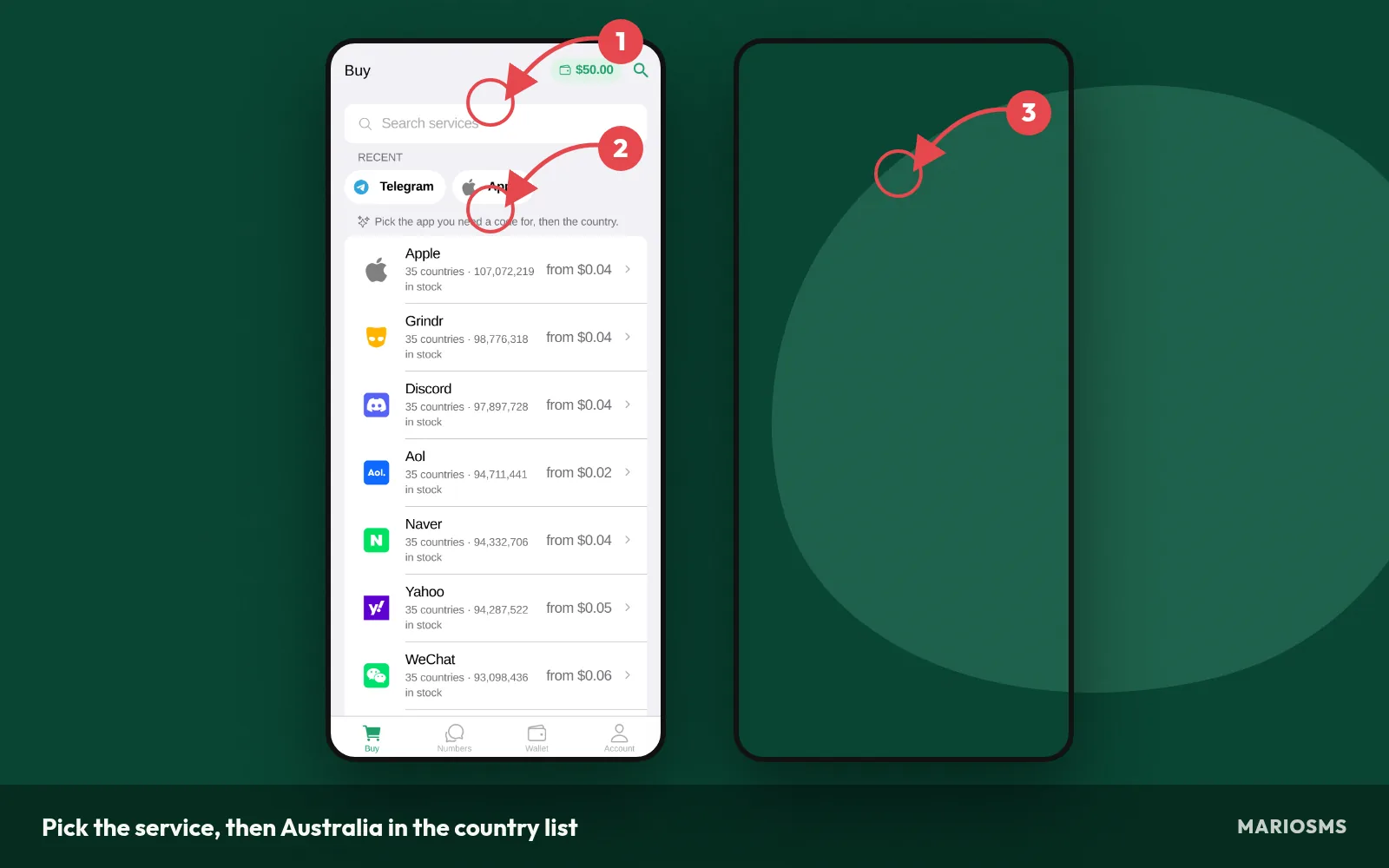
Pick the service, then Australia in the country list
- Top up your balance. Add funds by card or crypto. Numbers start at $0.04, and the price depends on the service and the country, so a small top-up covers several attempts.
- Pick the service. Search for the app or website that will send the code. Prices and stock are listed separately for each service, so choosing the exact one shows you the real cost before you commit.
- Choose Australia. Search for Australia (+61) in the country list and check the price shown next to it. The Australian numbers page lists which services are currently in stock.
Steps 4 to 5: copy the reserved number while the timer runs
When you confirm, the app reserves a real Australian mobile number for a single number activation and starts the timer, as the screenshot shows. The timer starts as soon as you confirm, so open the sign-up form in another tab or app first.
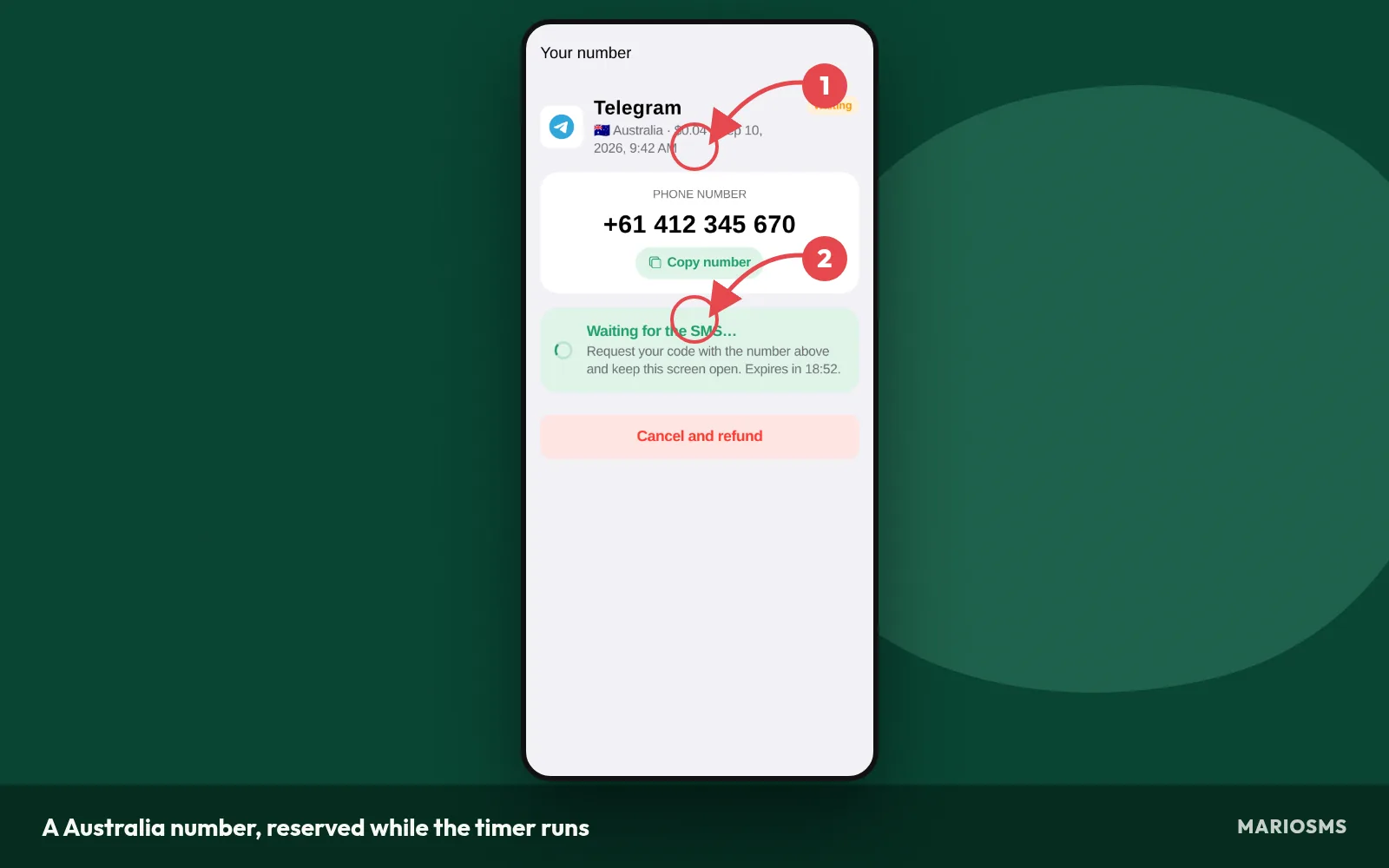
A Australia number, reserved while the timer runs
- Copy the number. Tap the number to copy it. If the form has its own country code field set to +61, paste only the digits after the country code. Leave out the leading 0 that Australian numbers carry in local format.
- Request the code. Paste the number into the service’s form and tap the button that sends the code. Keep the rental screen open while you wait so you see the SMS the moment it lands.
Step 6: read the code and finish the sign-up
The SMS shows up in the app or dashboard, usually within a minute, and the screenshot shows the code on the rental. If the timer runs out and nothing arrives, the activation cancels and the price goes back to your balance automatically.
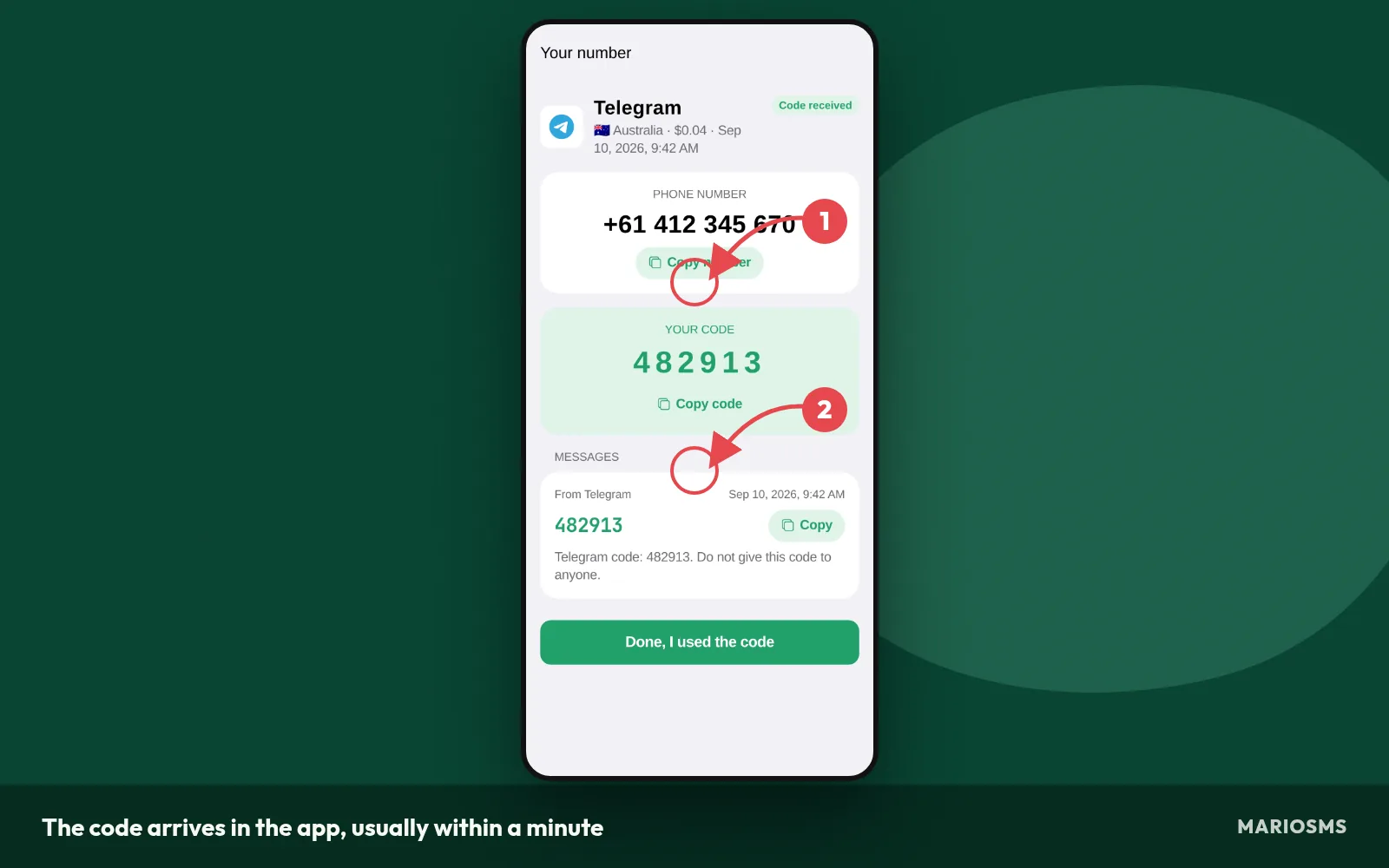
The code arrives in the app, usually within a minute
- Enter the code. Copy the code into the service’s form and submit it right away. The service decides how long its own code stays valid, and that limit has nothing to do with the MarioSMS timer. A code can expire on the service’s side while the rental is still active.
Using the REST API instead of the app for QA teams
QA teams testing an OTP flow can run the same six steps through the REST API. A test script requests an Australian number for a service, enters it in the sign-up form under test, checks for the incoming SMS and reads the code, so nobody has to tap through the app.
The API comes with examples in Python, Node.js, Go and PHP. Keep test accounts within the acceptable use policy, which allows QA and OTP testing but never ban evasion or impersonation. Each rental still has its activation timer. If a test run gets no SMS, the price goes back to the balance and the script can try again on a new number.
Which services have Australian numbers in stock, and what do they cost?
Most stocked services for Australia
The table below lists the services with the most Australian numbers available right now. Each row shows the price of one activation and how many +61 numbers are free for that service. A high count means you can rent a number, and a second one if the first gets no code, without waiting for stock to refill.
Australia numbers: most stocked services
| Service | Price | Numbers in stock |
|---|---|---|
| apple | $0.50 | 9,642,563 |
| wise | $0.11 | 2,011,352 |
| airbnb | $0.88 | 1,712,138 |
| PayPal | $1.84 | 1,704,753 |
| $0.22 | 1,667,062 | |
| Discord | $0.32 | 1,568,782 |
| $0.55 | 1,568,542 | |
| $4.68 | 1,558,815 | |
| Microsoft | $0.24 | 1,494,028 |
| aol | $0.06 | 1,493,159 |
| eBay | $0.75 | 1,473,557 |
| $0.10 | 1,457,317 |
Source: MarioSMS catalog, 2026-09-13. Price per number, stock in brackets.
Cheapest Australian numbers today
MarioSMS prices start at $0.04 per number, but an Australian number costs a different amount for each service. The table below sorts today’s Australian stock by price, lowest first, so you can see which services sit at the bottom of the range and which cost more.
Cheapest Australia numbers today
| Service | Price | Numbers in stock |
|---|---|---|
| naver | $0.04 | 1,092,573 |
| aol | $0.06 | 1,493,159 |
| fambase | $0.06 | 26,979 |
| classpass | $0.07 | 192,970 |
| geekay | $0.07 | 69,599 |
| razer | $0.07 | 67,833 |
| grindr | $0.08 | 1,132,707 |
| imo | $0.08 | 430,580 |
Source: MarioSMS catalog, 2026-09-13. Price per number, stock in brackets.
The price of a +61 number depends on two things. The first is the service you need the code for, because each service has its own rate for Australia. The second is the stock level. When many numbers are free for a service, the price tends to stay low. When only a few are left, it usually goes up.
Both tables are snapshots. Counts drop as other users rent numbers and rise when new numbers are added, so a row can look different a few hours later. Check the live figure on the Australia numbers page or in the app before you top up your balance.
You only pay when a code arrives. If the activation timer runs out with no SMS, the rental cancels and the price goes back to your balance automatically. A cheap row with thin stock can cost you a few minutes, but it will not cost you money.
When the service accepts numbers from other countries
Some services only need a working mobile number to send a one-time code, and the country code makes no difference to them. Others want +61 because they limit sign-ups, content or features to Australia. Open the country dropdown in the sign-up form. If it lists other country codes, you can usually use another country.
| Situation | Use an Australian number? | Reason |
|---|---|---|
| Sign-up form only accepts +61 | Yes | Other country codes are rejected at the form |
| Account needs Australia-only features or content | Yes | The account region often follows the number |
| Form accepts any country code | Not required | Any working number can receive the code |
| Australian stock for the service is at or near zero | Try another country if the form allows it | A country with stock delivers the code sooner |
| QA test of an OTP flow built for Australian users | Yes | The test should match what real users will see |
MarioSMS keeps numbers from 35+ countries in stock, and the same service may cost less or have more numbers in one of them. The Canada guide and the Austria guide walk through the same process for those countries.
When Australian stock runs low, switch countries in four steps:
- Open the service in the app or at app.mariosms.com and change the country filter.
- Compare the price and the number of numbers in stock for two or three countries.
- Check that the sign-up form accepts that country’s code before you rent.
- Rent the number and enter it in the form while the activation timer is still running.
What should you do when no SMS arrives on your Australian number?
Most missing codes come from four causes. The service picked in the app doesn’t match the site, the form rejected the number format, resend was pressed too often, or the user gave up before the activation window closed. Check each one in order before you pay for another number.
If none of the fixes work, you lose nothing. When the timer on a number runs out and no SMS has arrived, MarioSMS cancels the activation and puts the price back on your balance. The image above shows the refund. Work through this routine first:
- Check that the service you rented matches the site sending the code, not a similar app from the same company.
- Check that the form shows the number exactly as you entered it, with the right country code.
- Press resend once, then stop.
- Leave the code screen in the app or at app.mariosms.com open until the timer ends.
- If the timer runs out, rent a fresh number or pick a different service option.
Check the number format the site expects (+61 4xx or 04xx)
Australian mobile numbers start with 4 after the +61 country code. Inside Australia people write the same number with a 0 in front, as 04xx xxx xxx. If the form already shows +61 in a country dropdown, enter the nine digits starting with 4 and drop the 0. Typing +61 04xx creates a number that doesn’t exist, so the SMS never leaves the sender.
Resend once, then wait inside the activation window
Many sites limit how many codes one number can request in a short period. Tapping resend three or four times can trigger that limit and block delivery altogether. Press resend once, about a minute after the first request, then wait. Codes usually appear within a minute, but a slow sender can still deliver later in the window.
What happens when the timer runs out
Every rented number has a timer, called the activation window. If the window closes with no SMS, the activation cancels on its own and the price goes back to your balance automatically. You don’t need to open a ticket or ask for a refund. Your balance goes back to what it was before you rented, so you can rent again straight away.
When to try a fresh number or a different service option
If a number times out, rent a new Australian number instead of reusing the old one. The sender may have flagged the old number or hit a rate limit on it. If two fresh numbers in a row fail, open the Australian numbers page and check whether the site has a second service listing, such as a separate entry for its business app.
What are the legitimate limits of a rented Australian number?
A rented Australian number covers one verification. You rent it, receive one code inside the activation window, and then the number is no longer yours. It suits three jobs: keeping your personal SIM off sign-up forms, opening a second account for a legitimate reason such as a separate work profile, and QA teams checking that an OTP flow delivers to +61 numbers.
Accounts that will ask for the number again later
Some services send a new code weeks or months after sign-up. This can happen when you log in from a new device, reset a password or turn on two-factor authentication. A rented number cannot receive that code because you no longer control it. If you also lose access to the linked email, you may not be able to recover the account at all.
Before you rent, put the account into one of two groups:
- The service checks the phone only at sign-up. A rented number fits.
- The service uses SMS for logins and recovery, or the account holds data you need to keep. Use a number you keep long term, such as your own SIM.
After sign-up, add a recovery email and an authenticator app wherever the service offers them. That way the phone number is not your only way back in.
Uses that are not allowed
You cannot use MarioSMS numbers to get back onto a platform that banned you or to pose as another person or business. Bulk account creation for spam, fake reviews or repeated claims on sign-up promotions is also off limits. The full rules are on the acceptable use page. If a platform has suspended your account, appeal through its support form. A new +61 number is not the way back in.
Frequently asked questions about Australian numbers for SMS
Is a MarioSMS Australian number a real mobile number?
Yes. MarioSMS rents real mobile numbers with the +61 country code, not app-generated lines. That matters because many sign-up forms check the number type and reject VoIP numbers before they send a code. A real mobile number looks like any other Australian SIM to that check.
How long does the code usually take to arrive?
Most codes show up in the app or dashboard within a minute of the service sending them. Every number has a timer, called the activation window. If you request the code from the service soon after you rent the number, it arrives while the window is still open.
Can I use the same Australian number twice?
Each rental covers one verification. Once the code arrives and the activation ends, that number goes back into the pool. If a service asks for a new code later, rent a new activation. You may get a different +61 number, so don’t make a rented number the only recovery method on an account you plan to keep.
Do I pay if the SMS never arrives?
No. If the timer runs out and no SMS has arrived, the activation cancels on its own. The full price goes back to your MarioSMS balance, and you don’t have to contact support. You can use that refunded balance on another Australian number or try a different service right away.
Can I get an Australian number without being in Australia?
Yes. You rent the number and read the code in the MarioSMS app for iOS or Android, or in the web app at app.mariosms.com. The SMS reaches the Australian mobile number, and the code shows up in your account wherever you are. Current stock and prices are on the Australia numbers page.
Which payment methods can I use to top up?
You can top up your balance by card or with crypto. Prices start at $0.04 per number and change by service and country. A small top-up covers several Australian verifications for services at the lower end of the price list.
Can developers request Australian numbers through an API?
Yes. MarioSMS has a REST API with code examples in Python, Node.js, Go and PHP. A QA team can rent a +61 number, poll for the OTP and check the sign-up flow in an automated test. The same timer and automatic refund apply to API requests.