How to Get a Malaysia Phone Number for SMS
Rent a real +60 mobile number for one verification in the MarioSMS app or at app.mariosms.com. Pick the service, then Malaysia, and read the code in the app, usually within a minute. Prices start at $0.04 and vary by service and country. If no SMS arrives, the price goes back to your balance automatically.
The number is a real Malaysian mobile line, rented for a single SMS verification. It is not a long-term SIM, and you do not keep it after the code arrives. You can see current stock on the Malaysia numbers page.
Who needs a +60 number: travellers, expats and teams
Three groups ask for a Malaysia number most often:
- Travellers who want to sign up for a local app before they land, or before they buy a SIM card at the airport.
- Expats and people moving to Malaysia who want a second account for a local service and prefer not to hand out their home-country number.
- Product and QA teams testing an OTP flow for Malaysian users. They check that the SMS arrives on a real +60 line, that the sender name shows correctly and that the code parses in their app.
In each case the number covers one verification step. Rented numbers are meant for privacy, second accounts and testing, within the acceptable use policy.
What one activation includes and what it costs
One number activation covers one service on one number, with a fixed timer.
| Part of the activation | What you get |
|---|---|
| Number | One real +60 mobile number |
| Scope | One verification for the service you picked |
| Code delivery | Shown in the app or dashboard, usually within a minute |
| Timer | An activation window that counts down on screen |
| No SMS | Activation cancels, price refunded to your balance |
| Price | From $0.04, set by service and country |
You can top up the balance by card or crypto. At the $0.04 starting price, a $1 balance pays for up to 25 activations.
Why do services check the country of your phone number?
A phone number gives a sign-up form more than an address for the code. The country code points to a market, the digits after it show the number type, and a carrier lookup can confirm the line is on a mobile network. Services use these signals to choose the app version, catalogue, language and delivery area you see.
How the +60 prefix and number type are read at sign-up
Most sign-up flows run the same checks in this order:
- The form reads the country code. +60 marks the number as Malaysian, and many apps then switch the region setting to Malaysia.
- A validator checks the format. Malaysian mobile numbers start with 1 after +60 (for example +60 12 or +60 11). Landlines start with an area code, such as 3 for Kuala Lumpur.
- A line type lookup asks a carrier database whether the number is mobile, fixed line or VoIP.
- The service sends the SMS and waits for the code within its own time limit.
A regional app can reject a number at any of these steps. A food delivery app that only serves Malaysian cities, a shop with a Malaysia-only catalogue, or a team testing a Malaysia launch all need a +60 mobile number that passes step 3.
Why a real mobile number is accepted more often than a VoIP line
Many services block ranges that carrier databases label as VoIP or fixed line. Those numbers are cheap to create in bulk and hard to tie to a real subscriber. A non-VoIP number belongs to a mobile network range, so the lookup returns “mobile” and the SMS is delivered like any other text. MarioSMS rents this type of Malaysian number, one verification at a time.
When a local number matters for travellers and expats
A traveller can land in Kuala Lumpur with a home SIM that roams badly or not at all, and a local app will still ask for a +60 number before it shows nearby listings. Expats who have left Malaysia may want a second account on a regional service they still use. Developers testing OTP delivery for a Malaysia release need codes sent over real +60 mobile routes, because an emulator never gets a carrier SMS. The Malaysia numbers page shows which services have Malaysian numbers in stock.
How to get a Malaysia number in the MarioSMS app, step by step
The flow has six steps. The screenshot shows the order that matters most: search for the service first, then pick Malaysia in the country list. That way you only see Malaysian numbers that are in stock for that service, along with the price for each one.
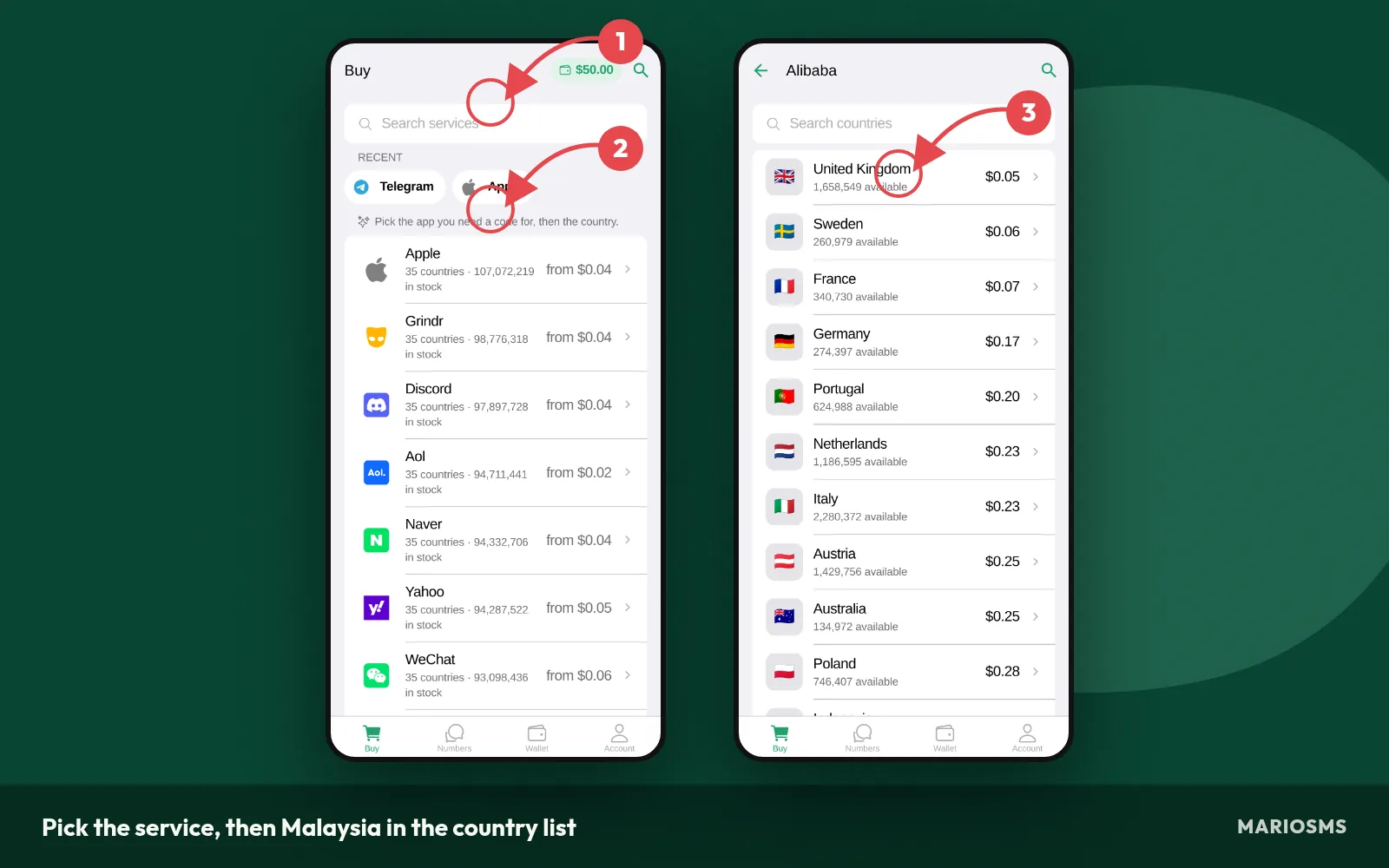
Pick the service, then Malaysia in the country list
Once you reserve a number, its activation timer starts and the app waits for the SMS. The code usually shows up within a minute, as in the screenshot. If no SMS arrives before the timer runs out, the activation cancels and the price goes back to your balance automatically.
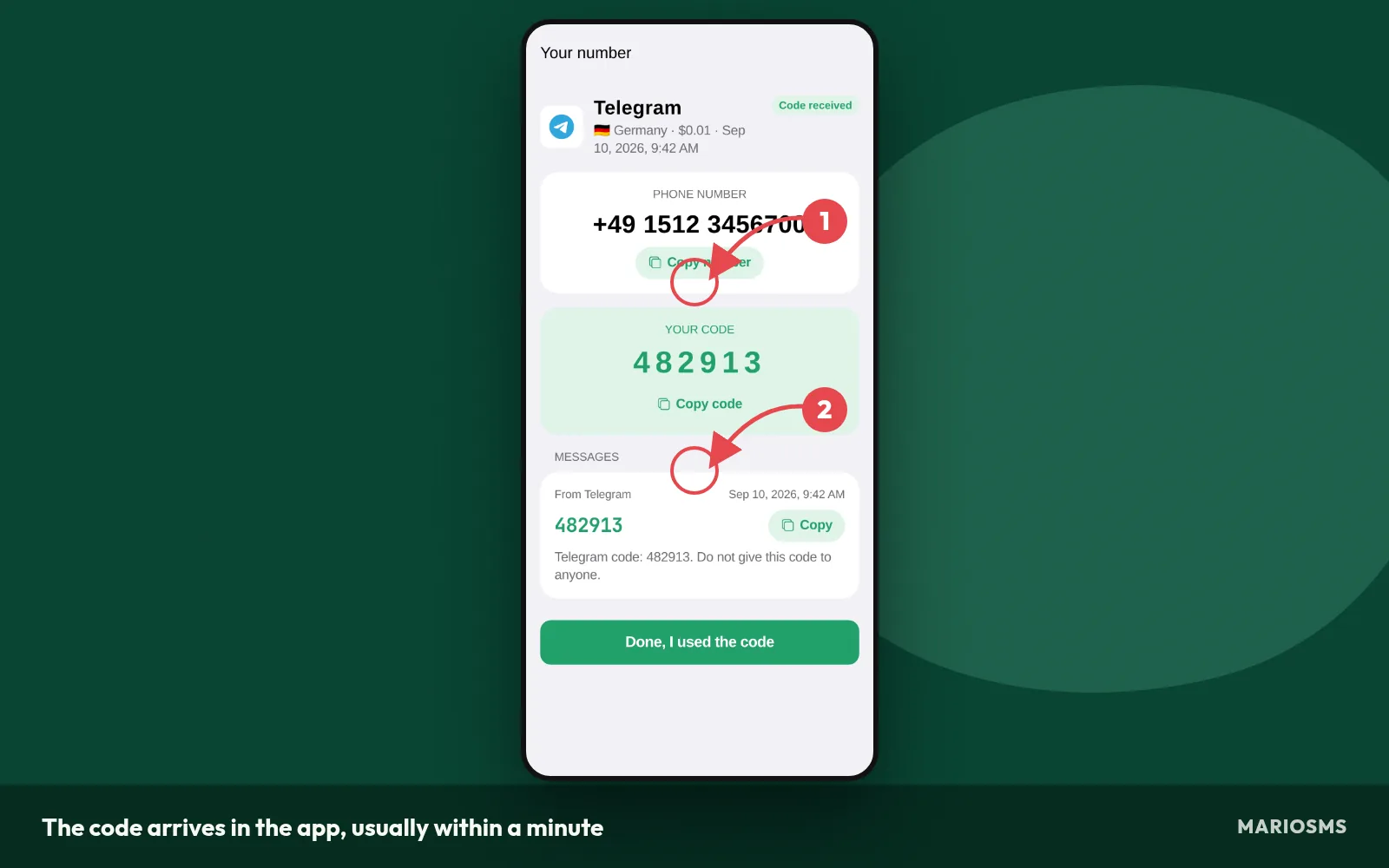
The code arrives in the app, usually within a minute
- Top up your balance by card or crypto. Numbers start at $0.04, and the price for Malaysia depends on the service.
- Search for the service you are signing up for.
- Choose Malaysia in the country list.
- Reserve the number and check how long its timer runs.
- Paste the number into the sign-up form, with the +60 code in the format the form expects.
- Copy the code when it appears and enter it in the service.
These six steps work the same way in the iOS app, the Android app and the web app at app.mariosms.com.
Pick the service first, then Malaysia
Stock and prices are set per service and per country. Reserve the number under the exact service you plan to verify with, because the activation is tied to that choice. The Malaysia numbers page shows which services have numbers in stock before you add funds.
Enter the number in the format the sign-up form expects
Malaysian mobile numbers start with the country code +60, followed by a mobile prefix that begins with 1, such as 12 or 17. Sign-up forms usually ask for the number in one of three ways.
| Form layout | What to type | Example |
|---|---|---|
| Country picker set to Malaysia (+60) | Number without 60 and without a leading 0 | 123456789 |
| Single free-text field | Full international number | +60123456789 |
| Local-format field | Leading 0 in place of +60 | 0123456789 |
If the form rejects the number, look for a doubled 60 or a leftover 0 before you try again.
Copy the code from the app or dashboard
The code shows up on the number’s card in the app or the dashboard. Copy it and paste it into the service’s verification field. The service sets its own expiry on the OTP, separate from the MarioSMS timer, so enter it as soon as it arrives.
Doing the same from the REST API for QA runs
Teams testing OTP delivery for a Malaysia release can run the same flow through the REST API. Request a number for a service and Malaysia, enter it in the test build, then read the code and compare it with what the app received. The docs include examples in Python, Node.js, Go and PHP. If a test run gets no SMS, the activation is refunded to the balance when the timer ends.
Which services and prices are in stock for Malaysia today?
Most stocked services on +60 numbers
The table below lists the services with the most Malaysian numbers available right now. Each row shows the price of one activation and how many numbers are in stock. A high count means you can usually get a number right away and still have spares if the first one receives no code.
Malaysia numbers: most stocked services
| Service | Price | Numbers in stock |
|---|---|---|
| nike | $0.23 | 3,099,041 |
| PayPal | $0.60 | 2,145,716 |
| Signal | $0.10 | 2,132,795 |
| $0.48 | 2,094,180 | |
| careem | $0.28 | 2,067,146 |
| hinge | $0.31 | 2,058,600 |
| TikTok | $0.06 | 1,908,307 |
| $0.67 | 1,835,438 | |
| KakaoTalk | $0.31 | 1,776,562 |
| bigolive | $0.67 | 1,628,739 |
| POF | $0.18 | 1,609,550 |
| alipay | $0.67 | 1,552,048 |
Source: MarioSMS catalog, 2026-09-15. Price per number, stock in brackets.
Cheapest Malaysia numbers right now
The second table sorts Malaysian numbers by price, lowest first. MarioSMS prices start at $0.04 per number. The cheapest rows are often different services from the most stocked ones, so check both tables before you decide how much to add to your balance.
Cheapest Malaysia numbers today
| Service | Price | Numbers in stock |
|---|---|---|
| TikTok | $0.06 | 1,908,307 |
| proton | $0.06 | 1,158,159 |
| Signal | $0.10 | 2,132,795 |
| noon | $0.10 | 545,697 |
| zoho | $0.12 | 1,254,978 |
| OkCupid | $0.14 | 520,668 |
| POF | $0.18 | 1,609,550 |
| Microsoft | $0.18 | 1,531,236 |
Source: MarioSMS catalog, 2026-09-15. Price per number, stock in brackets.
Price depends on the service as well as the country. Each service is supplied and priced separately, so a Malaysian number for one app can cost more than a Malaysian number for another. The image shows a rented +60 number waiting for a verification code, with its timer running.

Both tables are snapshots. Stock and prices change during the day as numbers are rented and used, so a service with plenty of numbers in the morning can run low by evening. Check the Malaysia numbers page or the app just before you buy, because the price shown there is the one you pay.
Trying a cheaper row first carries little risk. If no SMS arrives before the timer ends, the activation cancels and the full price goes back to your balance automatically. You can then pick another number, another service listing or another country without losing anything.
When a different country is the better pick
Some services only check that the number is a real mobile number that can receive SMS. They do not require a Malaysian one. For those services, Malaysia is one option among 35+ countries, and the best choice is the country with a low price and enough stock for that service at that moment.
To compare countries for one service:
- Open the service in the iOS or Android app, or in the web app at app.mariosms.com.
- Look at the country list and find Malaysia’s price.
- Note the stock count for the three cheapest countries.
- Pick the country with a low price and enough numbers left to retry if needed.
Stick with Malaysia when the account is tied to the country. That includes a local food delivery app, a Malaysian marketplace, or a QA run for a release aimed at Malaysian users. If Malaysia is out of stock for your service, Indonesia is a nearby country worth checking, and the Indonesia number guide covers the same steps.
What should you do when no SMS arrives on your Malaysia number?
Most missing codes come from a formatting slip or a service that sends slowly. While you troubleshoot, the number stays reserved for you, and its timer keeps counting down in the app or dashboard. The screenshot shows a Malaysia number in that state.
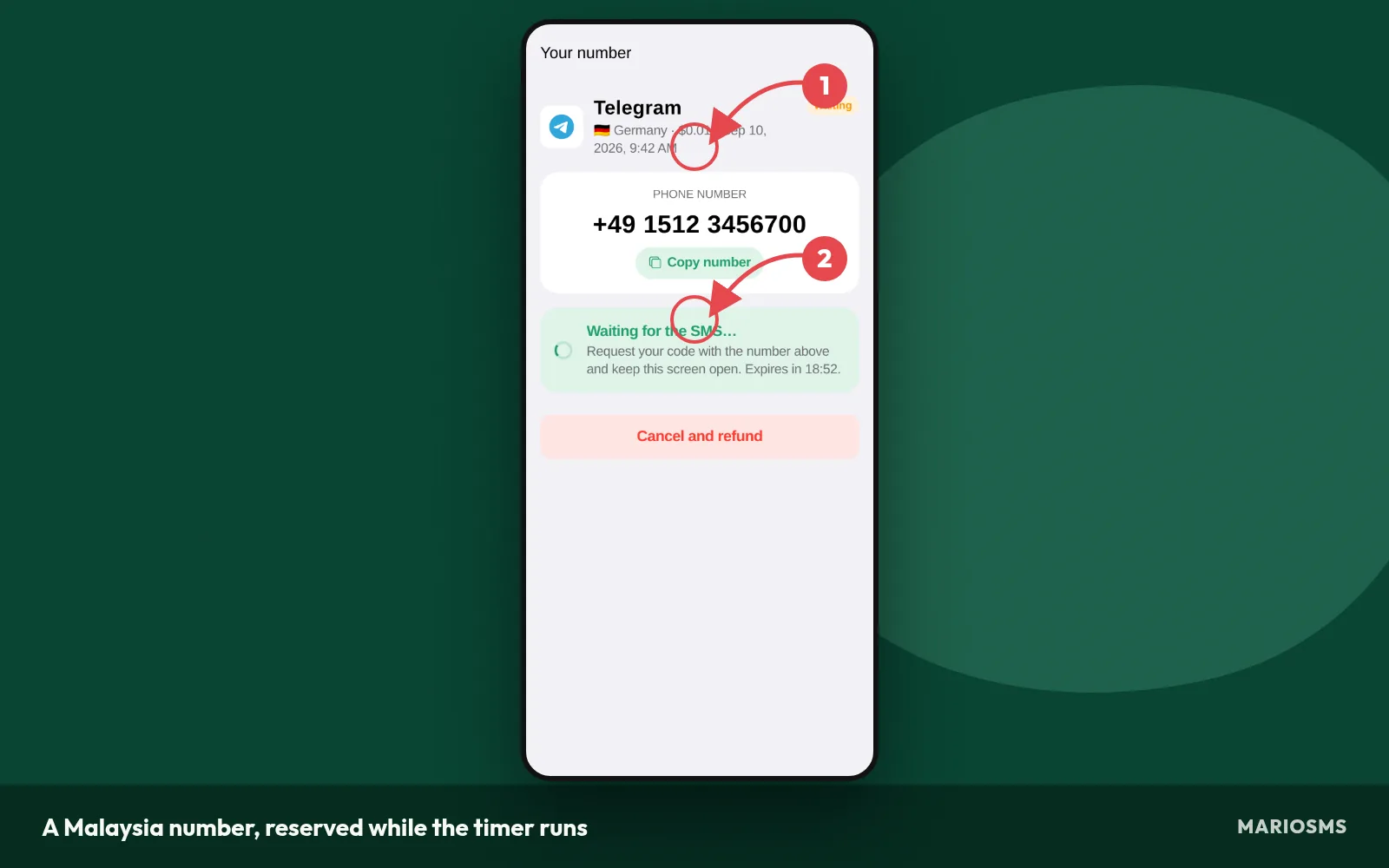
A Malaysia number, reserved while the timer runs
Work through the steps below in order. If none of them gets you a code, the last stage happens on its own. The activation cancels and the price goes back to your balance, which is what the image shows.
- Check that the service received the number with the +60 country code.
- Wait through part of the activation window before you change anything.
- Use the service’s resend option once.
- If the timer ends with no SMS, let the activation cancel.
- Rent a fresh Malaysia number from the Malaysia numbers page and start again.
Check the number format and the country code first
Inside Malaysia, mobile numbers are written with a leading 0, such as 012. In international format that 0 drops, so the service needs +60 followed by the remaining digits. If the signup form has its own country picker, set it to Malaysia and enter the number without +60. Otherwise the country code gets entered twice.
How the activation timer works
Every number activation has a timer. Codes usually show up within a minute, but some services queue their messages, so give it a few minutes before you act. If you ask for codes over and over, many services slow down or stop sending to that number, and that makes a late SMS even less likely.
Resending the code and trying a fresh number
Tap the service’s resend button once, then watch the app. If the second request also brings nothing, the service may be refusing to send to that particular number. Stop there. More resends only burn the time left on the window. A fresh number gives the service a new number to send to, and that often works on the next try.
How the automatic refund lands in your balance
If the timer runs out and no SMS arrived, MarioSMS cancels the activation and puts the price back in your balance automatically. You don’t need to open a ticket or ask for anything. The credit is available for the next number you rent. Whether the number cost $0.04 or more, a failed Malaysia attempt costs you nothing.
What are the legitimate limits on using a rented Malaysia number?
A rented Malaysia number is meant for a short list of honest jobs. MarioSMS sets them out in its acceptable use policy. They cover privacy, second accounts and testing, and there are two things you must never do with a number.
Uses that fit: privacy, second accounts and testing
Three uses suit a rental well:
- Keeping your personal number private. You can sign up for a Malaysian marketplace, forum or delivery app without giving it the SIM you use every day. Marketing texts and leaked sign-up databases then never reach your real number.
- Second accounts for legitimate reasons. This covers a separate profile for work, a side project or a shop page when the service asks for a Malaysia number and your own number is already linked to your main account.
- QA and OTP testing of a Malaysia release. Before launch, developers can check that a one-time code reaches a +60 number, arrives in the right format and fills the input field. The REST API can run the same check from a test script.
The hard limits are just as firm. Don’t use a rented number to get back onto a service that banned you, and don’t use it to pose as another person or business.
Why a one-time rental does not suit accounts you need to recover later
Each rental covers one SMS verification. After the code arrives and the activation window closes, you can’t receive more texts on that number. If the service later sends a login code, a password reset or a two-factor authentication prompt to it, you won’t see the message. For any account you plan to keep, go to the security settings right after sign-up and add your own number or an authenticator app.
Malaysia phone number for SMS: frequently asked questions
Is a rented Malaysia number a real mobile number?
Yes. MarioSMS rents real mobile numbers, not lines generated inside an app. This matters because many sign-up forms check whether a number belongs to a mobile carrier and reject numbers that look like internet phone lines. The glossary entry on non-VoIP numbers explains the difference. Each rental covers one verification.
How much does a Malaysia number cost?
Prices on MarioSMS start at $0.04 per number. The exact price depends on the service and the country, so a Malaysia number for one app can cost more than a number for another app. Check the current price on the Malaysia numbers page or in the app before you rent. The price comes out of your balance.
How long does the code take to arrive?
The code usually shows up in the app or dashboard within a minute after the service sends it. How fast it arrives depends on how quickly the service sends the SMS. Ask for the code only after the number shows as active on your screen, and keep the app open during the activation window so you can copy the code.
What happens if the SMS never comes?
Every number has a timer, called the activation window. If no SMS reaches the number before the timer runs out, the activation cancels and the price goes back to your balance automatically. You don’t need to file a refund request. After that you can rent a new Malaysia number and try the verification again.
Can I receive a second code on the same number later?
No. Each rental covers a single number activation. Once the code arrives and the timer ends, you won’t see any more texts sent to that number, including login codes and password resets. If a QA run needs a second OTP, rent another Malaysia number and start a new activation.
Can I get a Malaysia number without being in Malaysia?
Yes. You can rent one through the iOS or Android app or the web app at app.mariosms.com, and you don’t need to be in Malaysia. The number is Malaysian, so the service sees the +60 country code. People use these numbers for privacy, for a second account kept separate from their personal number, and for testing Malaysian sign-ups.
Can my team automate Malaysia OTP tests through an API?
Yes. MarioSMS has a REST API with code examples in Python, Node.js, Go and PHP. A test script can rent a Malaysia number, start the sign-up in your app, read the code when it arrives and complete the flow. If the timer runs out with no SMS, the price goes back to the balance and the script can try again.