How to Get a Netherlands Phone Number for SMS
You can rent a real Dutch mobile number (+31 6) for one verification in the MarioSMS app or at app.mariosms.com. Prices start at $0.04 and change by service. The code usually appears within a minute. If no SMS arrives before the timer ends, the activation cancels and the price goes back to your balance automatically.
The current list of Dutch services and prices is on the Netherlands numbers page. You can use the same account in the iOS app, the Android app and the web app. You top up the balance by card or crypto.
Who needs a +31 number: travellers, expats and teams
- Travellers planning a trip to Amsterdam or Rotterdam may want to sign up for a Dutch service before they land. A rented number keeps their home number off one more database.
- Expats often want a second account kept apart from their personal one, such as a separate profile for a local marketplace or a community app.
- QA and product teams building for Dutch users need to test OTP delivery on a real +31 number. They can check the sender name, the message format and how many seconds the code takes to arrive.
All of these are privacy, second-account and testing needs. The rules for fair use are on the acceptable use page.
What one rental includes: one number, one service, one timer
Each number activation covers one number for one service. You pick the service first, for example Telegram. You then get a Dutch mobile number reserved for that sign-up. A timer starts at the same moment, and the incoming code shows up in the app or dashboard while it runs. If the timer reaches zero with no SMS, you pay nothing and can rent a fresh +31 number right away.
Why do sign-up forms check which country your number is from?
A sign-up form learns more from your phone number than where to send a code. The country code tells the service which market you belong to. A number-type lookup tells it whether the line is mobile, landline or internet-based. Both checks usually run before any SMS goes out, and either one can stop the sign-up.
What a service learns from the +31 prefix
The +31 prefix marks a number as Dutch. Dutch mobile numbers then start with 6, so a full mobile number is +31 6 followed by eight digits. Landlines use area codes instead, such as 20 for Amsterdam or 10 for Rotterdam. A form can tell a mobile line from a fixed one by the first digits alone.
Services act on the prefix in a few ways:
- A Dutch app or a Netherlands-only offer accepts only +31 numbers, so a +44 or +1 number fails at the form.
- The country code decides the language, the regional content and the SMS route used to deliver the code.
- If the number’s country does not match the rest of the account, such as the region setting, the service may add extra checks.
Real mobile numbers compared with VoIP and landline numbers
Many services run a carrier lookup before sending a code. The lookup returns the operator and the line type. Numbers from internet calling providers show up as VoIP, and many sign-up flows refuse them because they are cheap to create in bulk. Landlines fail for a simpler reason, since most cannot receive SMS at all.
| Number type | Receives SMS | What a carrier lookup shows | Usual result at sign-up |
|---|---|---|---|
| Real mobile (+31 6) | Yes | Mobile line on a Dutch operator | Accepted |
| VoIP or app-based virtual | Often | VoIP line | Often refused |
| Landline (+31 20, +31 10) | Rarely | Fixed line | Refused, or a voice call offered |
A Netherlands number rented from MarioSMS is a real mobile number. The lookup reads it as a mobile line, just like a SIM in a Dutch phone. That is why a non-VoIP number gets through forms that reject virtual ones.
Why one verification per number keeps things simple
Services also count how many accounts use the same number. A number tied to several accounts on one platform can get flagged, and later codes may stop arriving. Each MarioSMS rental covers one verification for one service, so the number is used for that single sign-up and nothing else. The code shows up in the app or dashboard, usually within a minute. If the activation window closes with no SMS, the activation cancels and the full price goes back to your balance, starting from $0.04 per number.
How to get a Netherlands number in the MarioSMS app, step by step
The flow is the same on iOS, Android and the web app at app.mariosms.com. Choose the service first, then the country, because stock and price depend on that pair. The screenshot shows a service already selected, with the country list open and Netherlands highlighted.
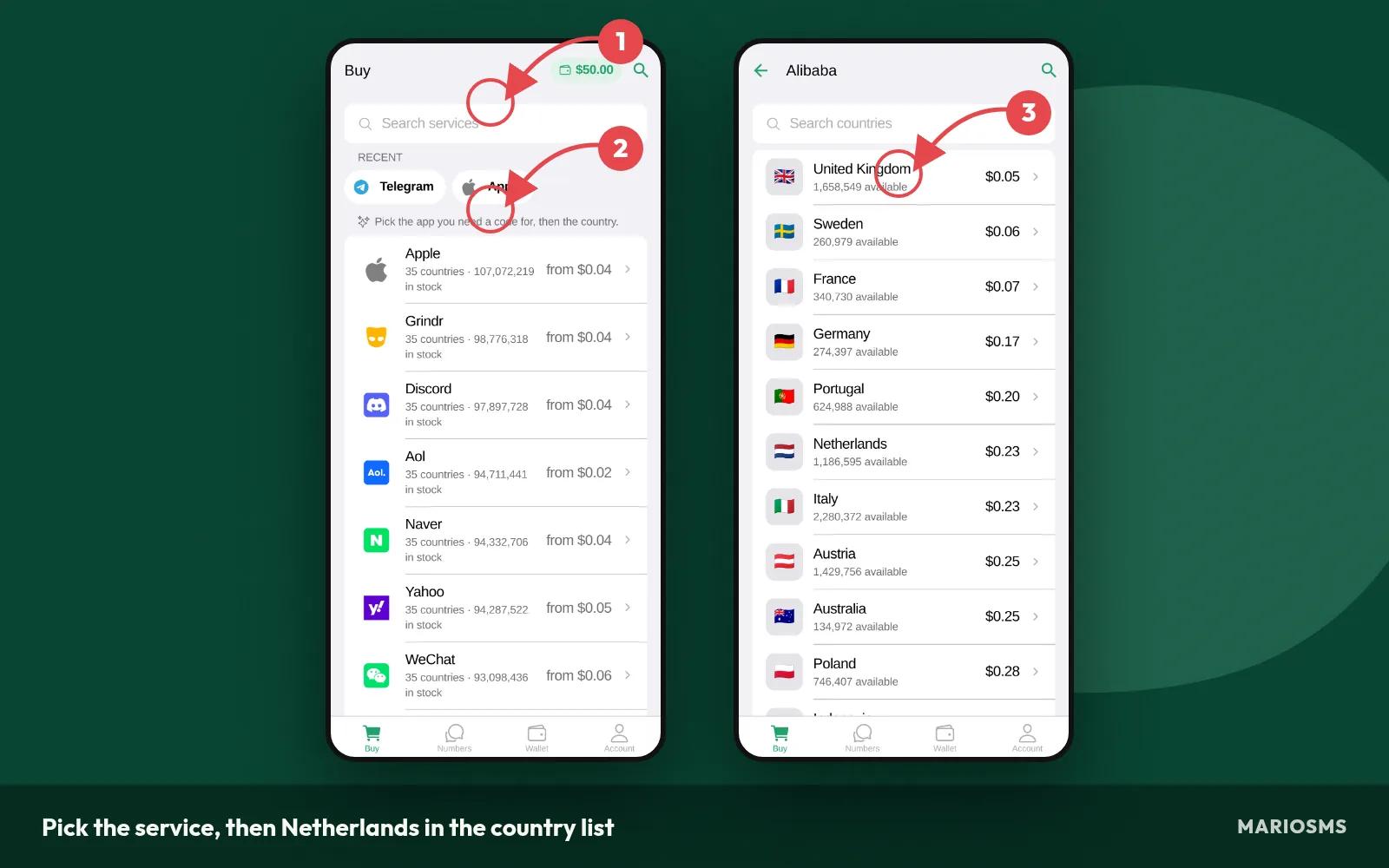
Pick the service, then Netherlands in the country list
After you confirm the price, the number is reserved for one verification. The screenshot shows a reserved Netherlands number with its timer counting down, a copy button next to the digits, and the empty field where the code appears once the service sends it.
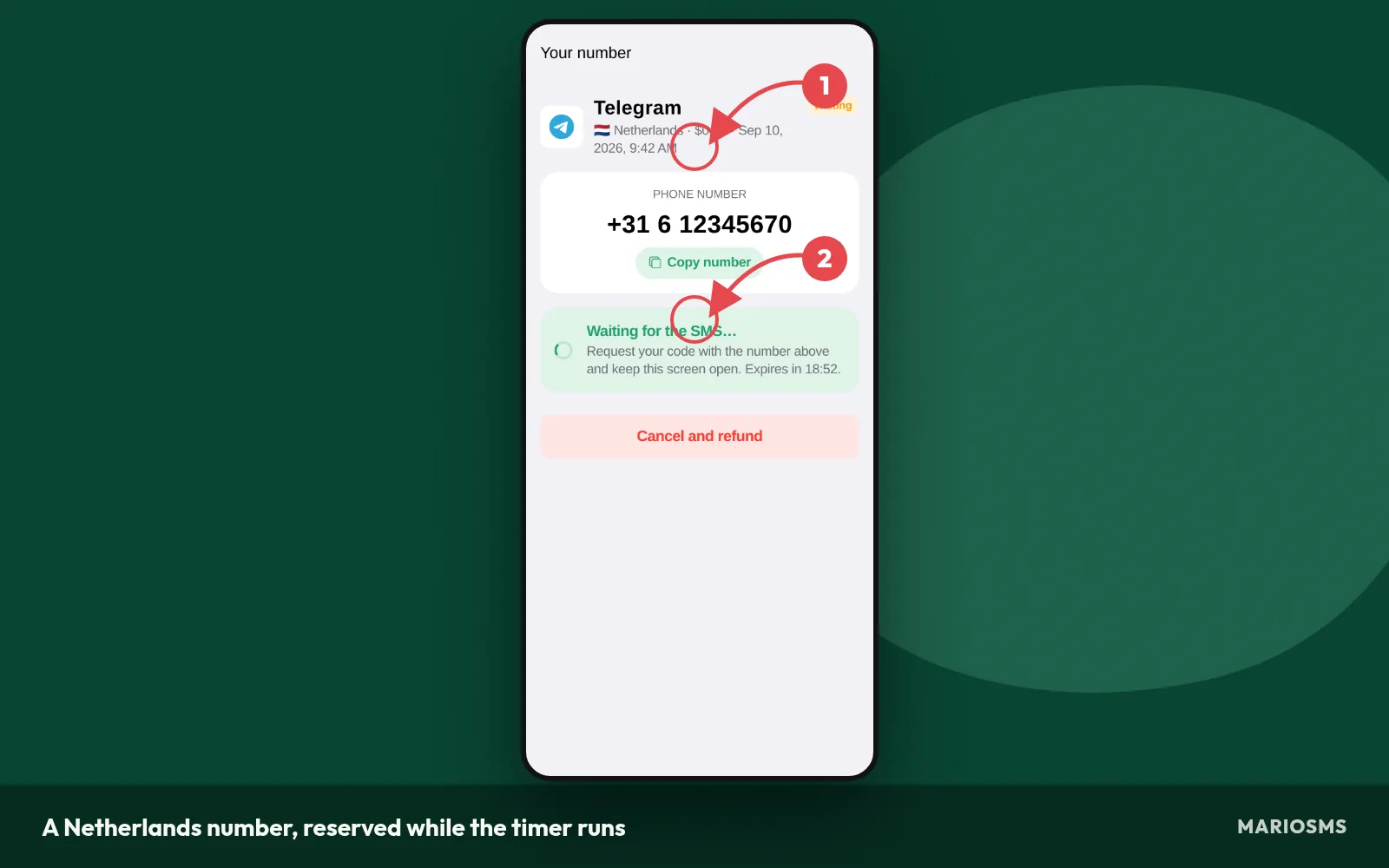
A Netherlands number, reserved while the timer runs
Top up your balance before you start
You can’t start a rental with an empty balance, so add funds first. Netherlands numbers start at $0.04 and the price changes by service, so a small top-up covers several sign-ups or a few test runs.
- Open the MarioSMS app on iOS or Android, or sign in at app.mariosms.com.
- Go to the balance screen and choose card or crypto.
- Enter the amount and confirm. The funds are credited to your account and ready for the next rental.
Pick the service, then Netherlands in the country list
Search for the exact service you are signing up for. A number rented for one service receives codes for that service only, so picking the wrong one wastes the activation.
- Type the service name in the search bar and select it.
- Open the country list and tap Netherlands. The row shows the current price for that service.
- Confirm the rental. You can also compare prices first on the Netherlands numbers page.
Reserve the number and enter it while the timer runs
The timer starts as soon as the number is reserved. Have the sign-up form open in another tab or app before you confirm, so you don’t lose time switching screens.
- Copy the number. It includes the +31 country code, and Dutch mobile numbers begin with +31 6.
- Paste it into the sign-up form. If the form has a separate country picker, select Netherlands there and paste the digits without +31.
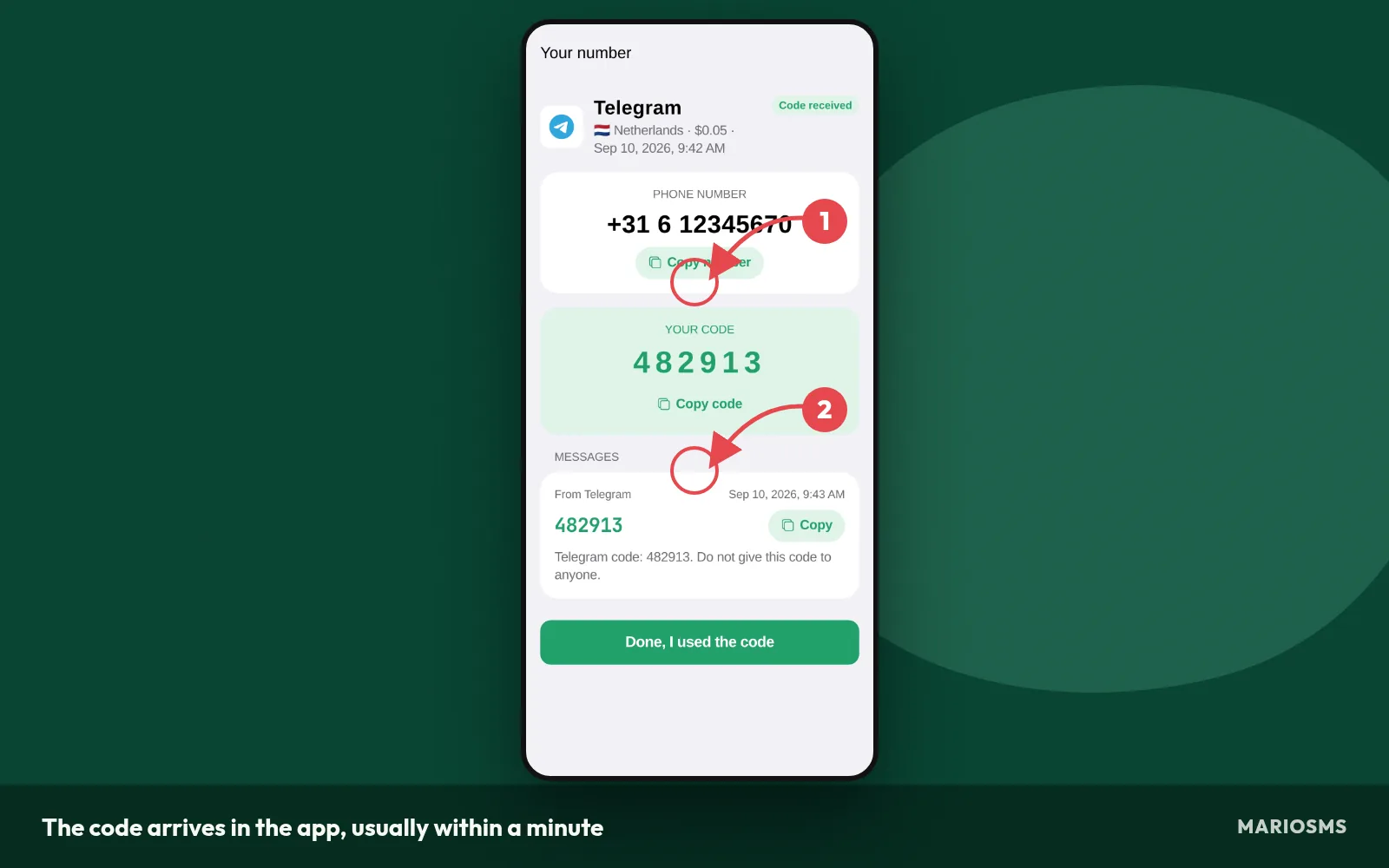
- Tap “send code” in the service, then go back to MarioSMS. The code usually appears within a minute.
- Copy the code into the form before the timer ends. If the window closes with no SMS, the activation cancels and the price goes back to your balance.
Using the REST API for repeated OTP tests
QA teams that test sign-up flows several times a day can skip the manual taps. The REST API runs the same steps from code: rent a Netherlands number for a chosen service, read the incoming OTP, and pass it to your test script.
The documentation includes examples in Python, Node.js, Go and PHP. Each call uses the same balance and timer rules as the app, so a test that receives no SMS gets its price refunded automatically. Keep API use within the acceptable use policy, which covers OTP testing on apps you build or are authorized to test.
Which services are in stock for Netherlands today, and what do they cost?
Reading the most stocked services table
The table below lists the services with the most Netherlands numbers available right now. Each row shows the service, the price of one number and how many numbers are in stock. A high count means you can cancel and rent again several times without that service running out.
Reading the cheapest Netherlands numbers table
The next table sorts Netherlands numbers by price, lowest first. MarioSMS prices start at $0.04 per number, but the price depends on both the service and the country. On the same pool of Dutch numbers, a code for one app can cost more than a code for another.
Netherlands numbers: most stocked services
| Service | Price | Numbers in stock |
|---|---|---|
| Microsoft | $0.29 | 3,245,092 |
| yalla | $0.31 | 3,233,302 |
| alipay | $0.41 | 3,083,298 |
| Yemeksepeti | $0.46 | 3,069,966 |
| careem | $1.21 | 3,050,123 |
| happn | $0.32 | 3,009,690 |
| hinge | $0.14 | 2,939,571 |
| Tango | $0.68 | 2,922,772 |
| Snapchat | $0.54 | 2,787,718 |
| Leboncoin | $0.14 | 2,785,828 |
| wise | $0.24 | 2,594,907 |
| naver | $0.64 | 2,319,245 |
Source: MarioSMS catalog, 2026-09-14. Price per number, stock in brackets.
Both tables are snapshots. Stock drops as other users rent numbers and rises as new ones come online, so a morning count can be lower by evening. Before you pay, check the live figures on the Netherlands numbers page or in the app.
Cheapest Netherlands numbers today
| Service | Price | Numbers in stock |
|---|---|---|
| zoho | $0.05 | 1,138,645 |
| noon | $0.09 | 2,002,483 |
| Fiverr | $0.10 | 1,726,791 |
| POF | $0.11 | 638,434 |
| Netflix | $0.11 | 1,381,765 |
| hinge | $0.14 | 2,939,571 |
| Leboncoin | $0.14 | 2,785,828 |
| Other | $0.14 | 778,009 |
Source: MarioSMS catalog, 2026-09-14. Price per number, stock in brackets.
A low price with a small stock count has a practical cost. If the first number gets no SMS within its activation window, the price goes back to your balance automatically. You still need another number, though, and thin stock may leave none for that service.
For a single sign-up, check the two tables in this order:
- Look for your service in the most stocked table. If it’s there, rent from that row.
- If it only shows up in the cheapest table, look at the stock count next to the price.
- If the count is low, rent now rather than later in the day.
- If the service is in neither table, search for it in the app. The tables show only part of the hundreds of services in stock.
When another country is the better choice for the same service
Not every sign-up needs a Dutch number. If the account accepts any working mobile number, the same service may cost less or have more stock in another of the 35+ countries. Before you pick Netherlands, check whether the form limits which country codes it accepts.
| Your situation | Better pick |
|---|---|
| The app asks for a +31 number | Netherlands, even at a higher price |
| Any country code is accepted | The country with the lowest price for that service |
| Netherlands stock for the service is low | A well-stocked country, if the form allows it |
| You are testing OTP delivery for Dutch users | Netherlands, so the test matches real conditions |
A QA team testing a Dutch launch should pay for Netherlands numbers, because the test depends on real +31 delivery. A personal second account on an app that accepts any country can use the cheapest number in stock. The Canada guide runs the same price check for Canadian numbers.
What should you do when no SMS arrives?
What a normal delivery looks like
You rent a Netherlands number, paste it into the sign-up form and tap “send code.” The SMS shows up in the MarioSMS app or dashboard, usually within a minute. The code sits next to the number while the timer keeps counting down, as the screenshot shows.
The code arrives in the app, usually within a minute
If nothing has arrived after two or three minutes, go through the checks below before you cancel anything. Waiting costs you nothing, because an activation that never gets an SMS is refunded to your balance when the timer ends, as the image shows.
- Check the number format you typed into the form.
- Tap the service’s resend button once, after its countdown ends. Tapping it over and over can trigger a lockout.
- Look for a limit message from the service, such as “too many attempts.” Services cap how many codes one account, device or network can request, so wait before you try again.
- Check how much time is left on the number’s timer.
- If the timer runs out, let the automatic refund happen.
- Rent a fresh number and request the code again.
Check the number format you entered (+31 and the digits after it)
A Dutch mobile number is +31, then 6, then eight more digits. A form usually rejects the number when the country code is entered twice, or when the domestic leading 0 (as in 06) is kept after +31. If the form has a separate country picker set to the Netherlands, type only the digits after +31, starting with 6. Copy the number from the app so you don’t make a typing mistake.
What happens when the timer runs out: cancellation and refund
Every rented number comes with a timer. If no SMS reaches the number before the timer ends, MarioSMS cancels the activation and puts the full price back on your balance automatically. You don’t need to open a ticket or ask for anything. A number bought at $0.04 that never gets its code ends up costing $0.00.
When to try a fresh number or a different service
Rent a new Netherlands number if the format was correct, you waited through the resend countdown and the service showed no limit error. Services sometimes reject particular numbers, so a second number can work when the first one didn’t. If two numbers in a row fail for the same app, check the Netherlands numbers page for that service’s current stock. Pick a better-stocked listing or, if the form accepts other countries, a different country.
What can you use a rented Netherlands number for?
A rented Netherlands number covers one verification. You rent it, the code arrives while the timer runs, and you finish the sign-up. That makes it a good fit for short, specific tasks. It is a poor fit for anything that needs the same number to receive messages months later.
Uses that fit: privacy, second accounts and testing
- Privacy hygiene. Sign up for a Dutch marketplace, a newsletter or a free trial without adding your personal SIM number to another company’s database, where it can leak or end up on marketing lists.
- Second accounts for real reasons. Keep a work profile separate from a personal one, or run a shop’s account apart from your own login, when the service asks for a different phone number per account.
- QA and OTP testing. Check that your app sends an OTP to +31 numbers, that the code arrives within your timeout and that the form accepts the Dutch number format. The REST API includes Python, Node.js, Go and PHP examples for scripting these checks.
Evading a ban, opening accounts in someone else’s name and impersonating a person or business are not allowed. The full list is on the acceptable use page.
Why a one-time number is a poor choice for account recovery
A temporary phone number is yours only while its activation window is open. Once the timer ends, you can’t receive SMS on it. If the service later sends a password reset, a login code or a new-device check to that number, you will never see it, and you can lose access to the account.
After you sign up, open the account’s security settings. Replace the rented number with one you keep long term, or switch two-factor authentication to an authenticator app. Do this the same day, before you log in from a second device.
Netherlands phone number for SMS: frequently asked questions
How much does a Netherlands number for SMS cost?
MarioSMS prices start at $0.04 per number. The exact price for a Netherlands number depends on the service you pick, because each service has its own rate. The Netherlands numbers page lists current prices. You top up your balance by card or crypto, and each number you rent is paid from that balance.
How long do I have to receive the code?
Each number comes with a timer, called the activation window, and you can see it next to the number in the app or dashboard. Codes usually arrive within a minute. Request the SMS from the sign-up form as soon as you copy the number, so the timer doesn’t run down while you fill in other fields.
Do I get my money back if the code never arrives?
Yes. If no SMS reaches the number before the activation window closes, the activation cancels on its own. The price goes back to your MarioSMS balance automatically, and you don’t have to file a ticket. You can then rent a new Netherlands number from that balance and try again.
Can I receive a second code on the same number later?
Plan on no. A rented number covers one verification, and it stops receiving SMS once its timer ends. A code sent next week will never reach you. If the service may ask for another code, add a number you keep long term or an authenticator app to the account on the same day you sign up.
Does it work from outside the Netherlands?
Yes. The number is a real Dutch mobile number, but you read the code in the MarioSMS app or web dashboard, not on a SIM in your phone. Your location doesn’t matter. Open app.mariosms.com in a browser, or use the iOS or Android app, from any country.
Can my team automate Netherlands OTP tests through an API?
Yes. MarioSMS has a REST API with code examples in Python, Node.js, Go and PHP. A test script can rent a Netherlands number, start your app’s sign-up flow, poll for the OTP and check that it matches. Each number has the same timer and automatic refund in the API as in the app.