How to Get a Egypt Phone Number for SMS
Rent a real Egyptian mobile number in MarioSMS and enter it on the service that asks for a phone. The code then appears in the app or dashboard, usually within a minute. Prices start at $0.04 per number and depend on the service. The screenshot shows an active +20 number waiting for its code.
Every rented number has a timer called the activation window. If no SMS reaches the number before the timer ends, the activation cancels itself. The full price then goes back to your balance automatically, and you don’t need to open a ticket or contact support. The image below shows a refunded activation.
What you get with a rented Egypt number
You get one Egyptian mobile number with the +20 country code, reserved for one verification on one service. It is a real mobile line and not an app-generated VoIP number. That difference matters because many sign-up forms reject VoIP number ranges before they send any code.
The code shows up in the MarioSMS app for iOS or Android and in the web app at app.mariosms.com. Developers can request numbers and read codes through the REST API, which has examples in Python, Node.js, Go and PHP. Egypt is one of 35+ countries in stock, and hundreds of services are covered.
What it costs and what happens if no code arrives
Each service and country has its own price, so an Egypt number for one app can cost more than one for another. The lowest price is $0.04. You top up your balance by card or crypto, and each number activation takes its price from that balance when you rent the number.
If the service never sends the SMS, the only thing you lose is the wait. The timer runs out, the activation cancels, and the charge returns to your balance, where you can use it for another number or another service. Current Egypt prices for each service are on the Egypt numbers page.
Why do services check the country of your phone number?
What the +20 prefix tells a service
A sign-up form reads your number before it sends anything. The +20 country code marks the number as Egyptian, and the next digits show what kind of line it is. In international format, Egyptian mobile numbers start with 1 after the country code (+20 10, 11, 12 or 15, depending on the operator). Fixed lines start with an area code instead, such as 2 for Cairo.
Many apps set their first defaults from that one field. They may suggest Arabic for the interface, set Egypt as the account region, show local content in feeds and stores, and list prices in Egyptian pounds where the service sells something. Some services also use the country to decide which features you get at sign-up. You can often change these settings later, but the number decides where the account starts.
Why real mobile numbers get codes that VoIP numbers do not
Most verification systems look up a number before they send the SMS verification code. The lookup returns the carrier and the line type: mobile, fixed line or VoIP. Many services only send codes to mobile lines. A mobile number is tied to a SIM from a licensed operator, so creating accounts in bulk takes more time and costs more.
A VoIP number from an internet calling provider often fails that lookup. The form rejects it, or it accepts it and the code never arrives. A landline fails for a simpler reason: most fixed lines cannot receive SMS at all. A non-VoIP number on an Egyptian operator’s network looks like an ordinary mobile line, so the service treats it like any other local subscriber.
Who needs an Egypt number: travellers, expats and QA teams
- Travellers on a one- or two-week trip who want local delivery, ride or ticketing apps that ask for a +20 number, without buying a SIM they will throw away.
- Expats living in Egypt who want to keep their personal number private and use a separate number for a second account, such as a marketplace or classifieds profile.
- QA teams building for Egyptian users. They need a real +20 mobile line to check that the phone field accepts both local and international formats, that the Arabic SMS template displays correctly, and that the OTP arrives before the form’s resend button becomes clickable.
How to get an Egypt number in the MarioSMS app, step by step
Steps 1 to 3: top up, pick the service, choose Egypt
The steps are the same on iOS, Android and the web app at app.mariosms.com. Pick the service before the country, because both the stock and the price depend on the pair. In the screenshot, the service is already selected and Egypt is chosen from the country list.
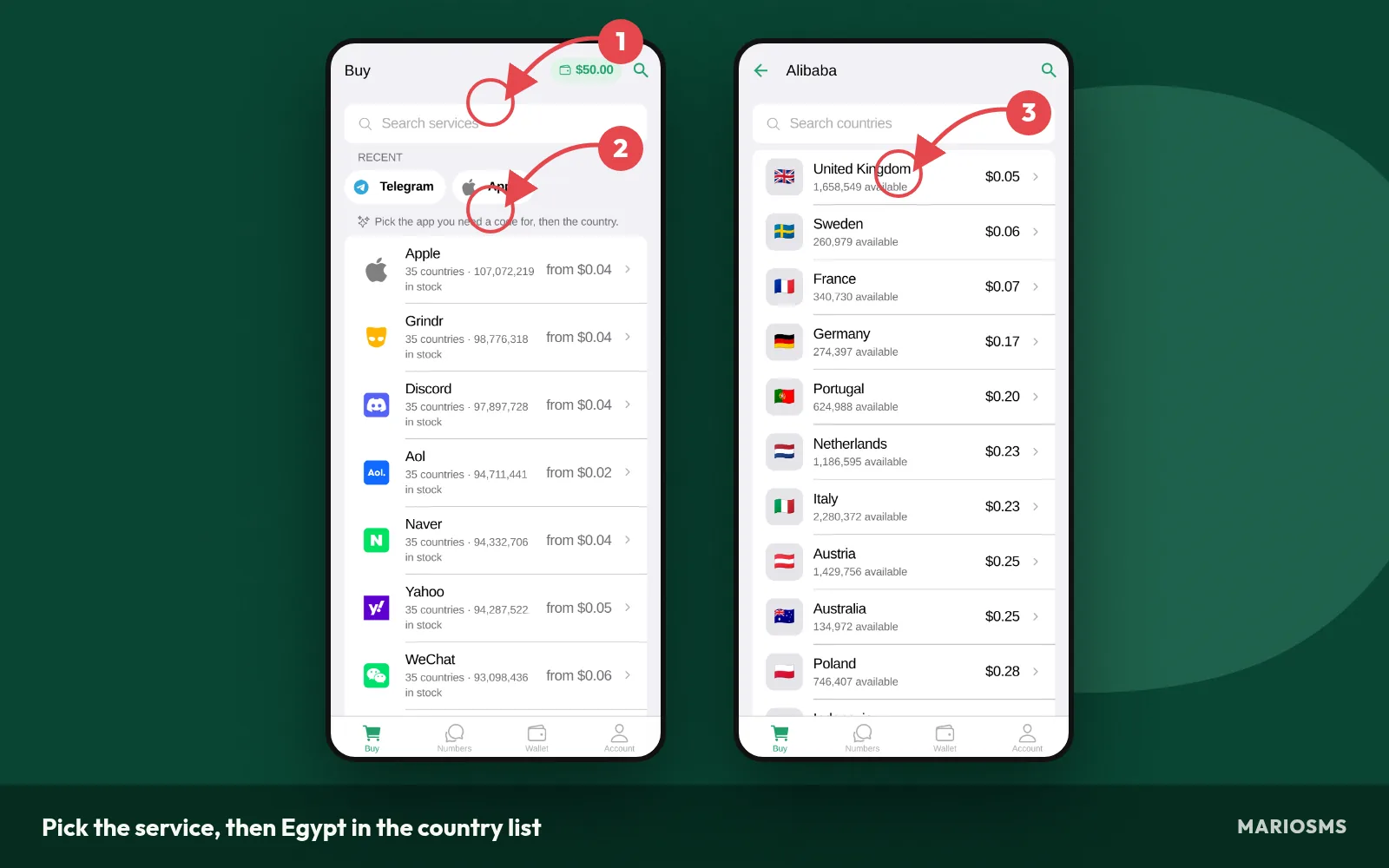
Pick the service, then Egypt in the country list
- Top up your balance. Add funds by card or crypto. Numbers start at $0.04, so a small top-up covers several activations.
- Pick the service. Search for the app or site where you are signing up and select that exact service.
- Choose Egypt. Open the country list and tap Egypt (+20). The price next to it is the cost of one Egypt number for that service.
Steps 4 to 6: reserve the number and watch the timer
When you tap buy, the app reserves a real Egyptian mobile number for your verification only and starts the activation timer. As the screenshot below shows, the reserved number and its countdown appear together on one card.
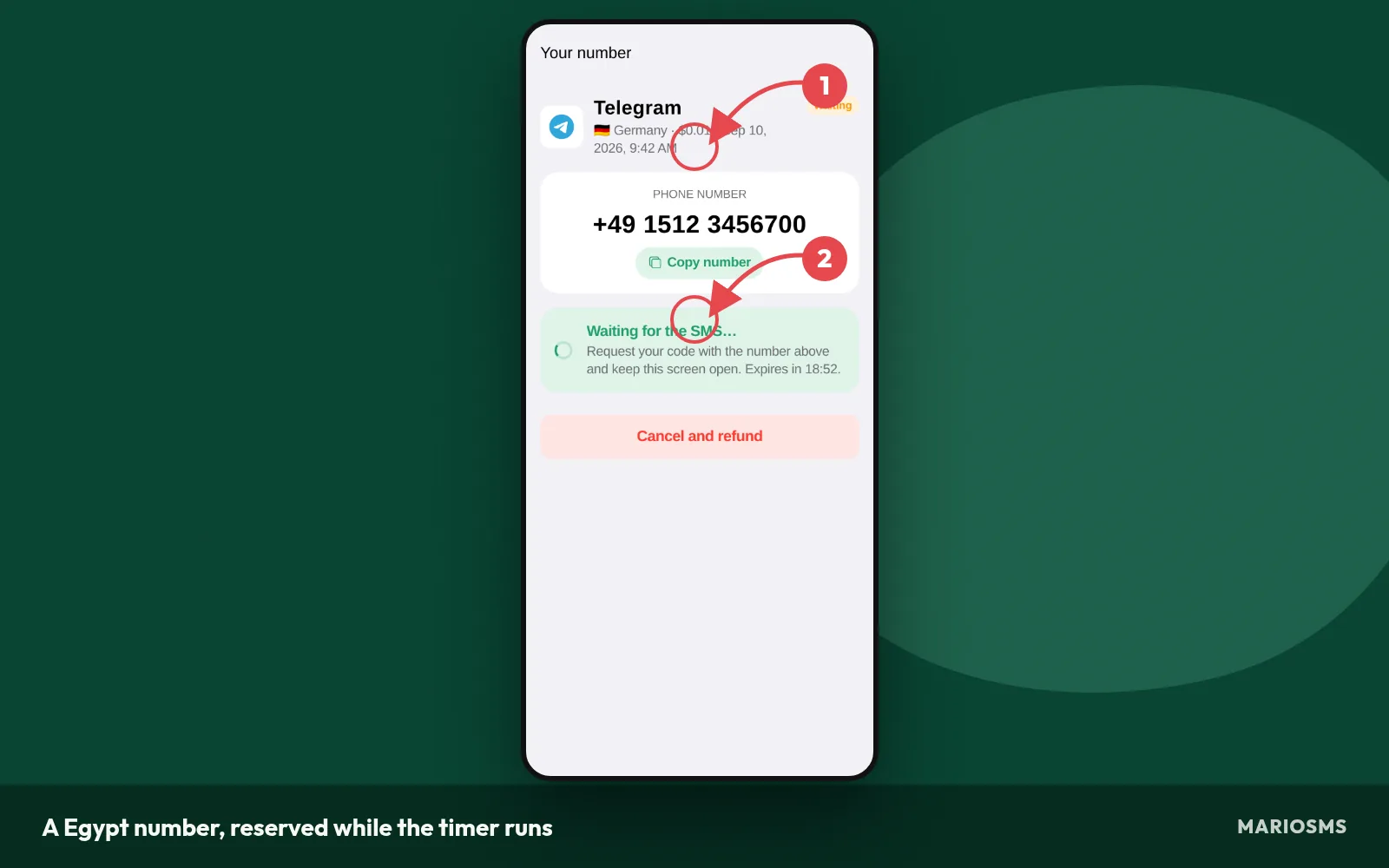
A Egypt number, reserved while the timer runs
- Reserve the number. Tap buy. The +20 number appears with a copy button.
- Enter it in the sign-up form. Paste it into the service’s phone field. If the form has its own country picker, set it to Egypt and paste only the local digits, without the +20 prefix.
- Request the code and watch the timer. Press send on the service’s side while plenty of time remains. If no SMS arrives before the timer ends, the activation cancels and the price goes back to your balance automatically.
Step 7: copy the code into the sign-up form
The code usually arrives within a minute of the service sending it. It appears in the app, or in the dashboard on the web, on the same card as the number you reserved. The screenshot shows a received code.
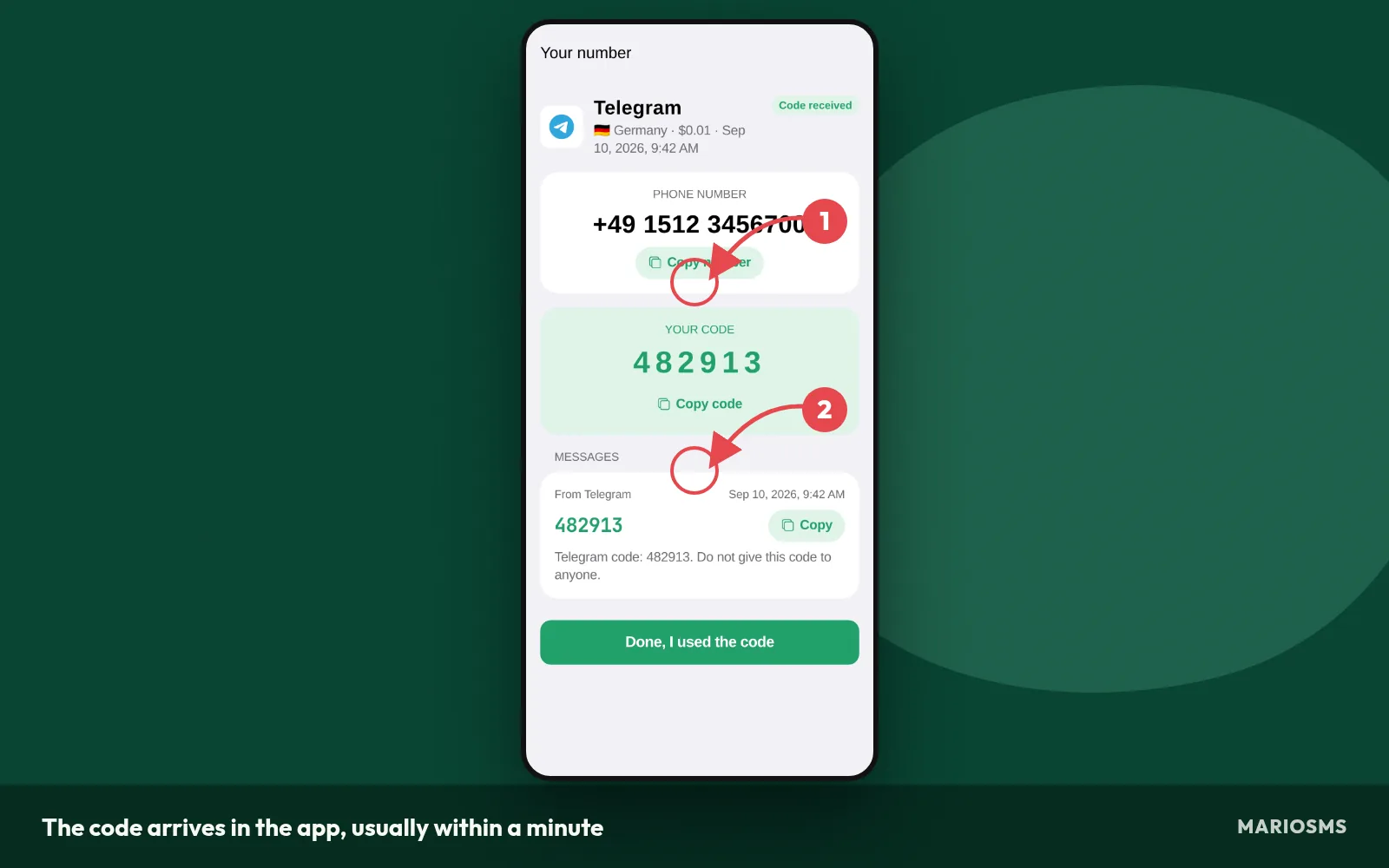
The code arrives in the app, usually within a minute
- Copy the code and paste it into the verification field. Many sign-up forms expire an OTP quickly, so paste it straight away and don’t leave the tab open while you do something else.
Each number covers one verification. Finish the sign-up while the code is valid, then add your own email as the account’s recovery method so you can still log in after the rental ends.
Running the same flow through the REST API
QA teams testing Egyptian sign-up forms can run these seven steps from code with the MarioSMS REST API. The documentation has examples in Python, Node.js, Go and PHP. A typical test script requests a number for a service and Egypt, enters it in the form being tested, and then checks for the SMS until the code arrives or the window closes.
When an activation times out through the API, it is refunded the same way as in the app. A test run that never receives an SMS costs nothing, so you can repeat the sign-up flow for each build without paying for failed attempts.
Which services have Egypt numbers in stock, and what do they cost?
Most stocked services for Egypt
The table below lists the services with the most Egypt (+20) numbers available right now, with the price per number and how many are in stock. A high count usually means you get a number on the first try. If one activation times out, the same service still has more numbers to rent.
Egypt numbers: most stocked services
| Service | Price | Numbers in stock |
|---|---|---|
| Yahoo | $0.12 | 9,053,264 |
| grindr | $0.16 | 8,591,314 |
| Microsoft | $0.26 | 8,375,055 |
| Netflix | $0.28 | 7,383,345 |
| TikTok | $0.17 | 7,275,491 |
| apple | $0.11 | 6,889,284 |
| $0.22 | 6,463,865 | |
| KakaoTalk | $0.28 | 4,349,919 |
| airbnb | $0.56 | 3,518,954 |
| PayPal | $0.38 | 2,476,523 |
| naver | $0.28 | 2,470,894 |
| $0.60 | 2,402,390 |
Source: MarioSMS catalog, 2026-09-27. Price per number, stock in brackets.
Cheapest Egypt numbers today
Egypt numbers start at $0.04, but each service has its own rate. The next table sorts Egypt numbers by price, lowest first, so you can see what one verification costs before you top up your balance by card or crypto.
Cheapest Egypt numbers today
| Service | Price | Numbers in stock |
|---|---|---|
| bigolive | $0.10 | 2,031,104 |
| POF | $0.10 | 87,454 |
| apple | $0.11 | 6,889,284 |
| Yahoo | $0.12 | 9,053,264 |
| rebtel | $0.14 | 13,334 |
| Discord | $0.14 | 1,399,552 |
| grindr | $0.16 | 8,591,314 |
| TikTok | $0.17 | 7,275,491 |
Source: MarioSMS catalog, 2026-09-27. Price per number, stock in brackets.
Price and stock are set for each service, not for the country as a whole. The same pool of Egypt numbers can be cheap for one service and cost several times more for another. Services filter numbers differently, and some get much more demand than others. A cheap row with a small stock count can sell out within minutes.
Both tables are snapshots. Stock goes down as other users rent numbers and goes back up as new SIM cards come online, so the counts change several times a day. Check the live figures on the Egypt numbers page or in the app right before you rent, because that is the price you actually pay.
When to pick a different country instead
Egypt is the right choice when the service expects a +20 number, for example when you test an app built for users in Egypt. If the country doesn’t matter to the service, a country with more stock is often faster and sometimes cheaper. To compare countries:
- Open the MarioSMS app or app.mariosms.com and choose the service first.
- Look through the countries listed for that service. Each one shows its own price and stock, and 35+ countries are in stock overall.
- Pick a country that has a high stock count and a price you are happy with.
- Check that your account doesn’t need an Egyptian number. Some local apps only accept +20.
- Rent the number and start the verification while the activation timer is running.
Stock is thin for a service when you see a single-digit count, or when two activations in a row time out. Both are signs to switch countries and not to wait. A timed-out activation is refunded to your balance, so trying a second country costs nothing extra. The Finland and Greece guides use the same steps. Only the country code changes, to +358 or +30.
What should you do when the SMS never arrives?
Most missing codes come from one of three causes: a mistyped number, a resend limit on the service’s side, or thin stock for that service in Egypt. Work through the checks below in order. None of them costs extra money, because an activation that never receives an SMS is refunded automatically when its timer ends.
Check the number format before you blame the service
- Confirm the country code. Egyptian mobile numbers written locally start with a 0 (010, 011, 012 or 015). In international format you drop that 0, so 010 1234 5678 becomes +20 10 1234 5678. If you type +20 010…, the number is invalid and the service sends nothing.
- Match the form’s layout. If the sign-up form has a separate country picker, set it to Egypt (+20) and paste only the digits after +20. Many forms default to the US or to your IP’s country, and the code goes to a number that does not exist.
- Copy, don’t retype. Copy the number from the app or dashboard to avoid swapped digits.
Resend limits and cooldowns on the service side
- Request the code once, then wait. Most services start a countdown next to the “Resend” button after the first request. Pressing resend repeatedly can put the number or your session into a cooldown, and during that cooldown the service sends no SMS at all.
- Resend at most once, and only after the service’s own countdown finishes. If a second request produces nothing, stop there. More attempts on the same number rarely help and can get the number flagged by that service.
Let the timer run out and take the refund
- Keep the activation open. Every rented number has an activation window shown as a timer. A late code can still arrive while it runs, so leave the app or dashboard open. When a code arrives it usually shows up within a minute.
- Let the timer reach zero. If no SMS arrives, the activation cancels itself and the price goes back to your balance automatically.
Retry with a new number or another country
- Rent a fresh Egypt number for the same service from the Egypt numbers page. A different number often goes through where the first one did not.
- Switch country if two attempts time out. Two failures in a row usually mean stock for that service is thin. Pick another country with a healthy count and repeat steps 1 to 7 with that country’s code.
You never need to open a support ticket to get your money back for a failed attempt. When the timer expires without an SMS, the refund lands in your balance on its own, and you can use it for the next number right away.
What are the legitimate limits of a rented Egypt number?
One verification per rental, so plan for recovery
A rented Egypt number covers one number activation. You receive the code inside the timer window and enter it, and then the rental ends. The number goes back into the pool. You can’t count on getting the same +20 line again next week or next year.
This affects account recovery. If the service later sends a login code, a password reset or a new-device check to that number, you won’t receive it. Before you finish signing up, do these three things:
- Add an email address you control as the recovery method.
- Move two-factor authentication to an authenticator app if the service offers one.
- Save the backup codes the service shows you and store them offline.
If you plan to keep an account for years, use the rented number only to sign up. Your email and authenticator app are what keep you in afterwards.
What the acceptable use policy allows and rules out
The acceptable use policy allows three kinds of use:
- Privacy. You keep your personal SIM off sign-up forms and marketing lists.
- Second accounts for legitimate reasons. Examples include a separate work profile or an account for a side project.
- OTP testing. QA teams check that codes reach Egyptian numbers in the right format and within the expected delay.
The policy rules out two things. You can’t use a number to get around a ban a service placed on you. You also can’t use one to pose as another person or business. An account created for either purpose breaks the policy, even if the code arrived in under a minute and the activation completed normally.
Egypt phone number for SMS: frequently asked questions
Is a rented Egypt number a real mobile number?
Yes. MarioSMS rents real mobile numbers with the +20 country code, and each one serves a single verification at a time. The service you sign up for sends its code to that number the same way it would send it to any Egyptian subscriber. The code then shows up in the MarioSMS app or dashboard, usually within a minute.
How long do I have to receive the code?
Every number comes with a timer, called the activation window, which starts when you rent it. Ask the service for the code right away so the SMS arrives inside that window. Keep the app or dashboard open so you can copy the code as soon as it appears. Most codes arrive within a minute.
Do I pay if no SMS arrives?
No. If the activation window closes without an SMS, the activation cancels itself and the price goes back to your MarioSMS balance automatically. You don’t need to open a ticket or ask for a refund. You can use that credit for another attempt, either with a different Egypt number or with a number from another country.
Can I use the same Egypt number again later?
Plan on renting a new number each time. A MarioSMS rental covers one verification and ends when its activation window closes, so a code sent days later won’t reach you. For an account you intend to keep, set up recovery with a phone number or two-factor method you control long term. Use the rental only for the first code.
Can I get Egypt numbers through an API for testing?
Yes. MarioSMS has a REST API with code examples in Python, Node.js, Go and PHP. A QA script can rent a +20 number, trigger the OTP from the app under test, read the incoming code and check its format and delivery time. Failed activations are refunded to the balance automatically, so a test run that times out costs nothing.
Do I need to be in Egypt to use a +20 number?
No. The number is Egyptian, but the code is delivered to your MarioSMS account. You can open that account from the iOS or Android app, or from the web app at app.mariosms.com, wherever you are. Current Egypt stock and prices for each service are listed on the Egypt numbers page.