How to Get a Sweden Phone Number for SMS
Open the MarioSMS app or the web app at app.mariosms.com, pick Sweden, choose the service that will send the code, and rent a real Swedish +46 mobile number for that one verification. The code usually shows up in the app within a minute, and prices start at $0.04.
Stock and price depend on the service. The table below lists the services with the most Swedish numbers available right now, so you can check the price before you top up. A service missing from that list may still be in stock. Search for it by name in the app or on the Sweden numbers page.
Sweden numbers: most stocked services
| Service | Price | Numbers in stock |
|---|---|---|
| Yahoo | $0.50 | 9,092,931 |
| $0.06 | 7,746,375 | |
| $0.06 | 7,589,955 | |
| apple | $0.06 | 6,385,795 |
| KakaoTalk | $0.06 | 4,364,741 |
| Fiverr | $0.06 | 3,955,810 |
| baidu | $0.06 | 2,525,579 |
| PayPal | $0.06 | 2,093,208 |
| eBay | $1.93 | 1,984,600 |
| Yemeksepeti | $0.06 | 1,919,202 |
| Snapchat | $0.06 | 1,843,207 |
| nike | $0.06 | 1,800,111 |
Source: MarioSMS catalog, 2026-09-27. Price per number, stock in brackets.
Each rental covers a single number activation. You type the +46 number into the sign-up or login form, the service sends its one-time code, and the SMS appears on your screen, as in the screenshot. You don’t install anything, and no SIM card is posted to you.
Who needs a +46 number: travellers, expats and teams
Travellers can register a Swedish app from home before they arrive. Expats who have moved away often keep Swedish accounts that still expect a +46 number for SMS verification. Product and QA teams use Swedish numbers to test how their own OTP flow works for users in Sweden.
Two more groups use it too. Some people want to keep their personal number off a sign-up form for privacy reasons. Others run a second account for a legitimate reason, such as separating work from personal use on the same service.
What you pay and when you get your balance back
The price comes off your balance when you rent the number. Each number has a timer, called the activation window. If the SMS arrives inside that window, the rental is complete. If no code arrives, the activation cancels and the full price goes back to your balance automatically.
You can top up your balance by card or crypto. If the service you pick is priced at the $0.04 minimum, a $1 top-up covers 25 Sweden rentals, and you only pay for rentals where the code arrives.
Why do services check that your number is Swedish?
When you enter a phone number, a service reads more than the digits. The country code and the number range tell it which region you are in, which language to show, which features to turn on and which local rules apply. A number that doesn’t match what the service expects can be rejected before any code is sent.
What the +46 prefix and mobile ranges tell a service
The +46 prefix marks a number as Swedish. After the country code, Swedish mobile numbers start with 7, as in +46 70, +46 72 or +46 73. Landlines use geographic area codes instead, such as 8 for Stockholm. Services check these ranges against numbering databases to sort a number into mobile, landline or another type.
The check happens in the signup form, usually within a second of submitting. A Swedish marketplace or delivery app may use it to set the Swedish interface, show local listings, apply Swedish consumer terms or limit a feature to one country. If the platform only sends SMS codes to mobile numbers, a landline gets refused on the spot, because a landline can’t receive a text.
Why a real mobile number passes where a VoIP number often fails
Many platforms look up the carrier behind a number before sending an SMS. A VoIP number belongs to an internet telephony provider, and lookup tools flag those ranges. Services that see many fake signups from VoIP ranges often block them outright, and the user gets an error like “this number cannot be used.”
A real mobile number is registered to a Swedish mobile carrier, so the lookup returns the result the service expects. That is why a non-VoIP number on a Swedish mobile range gets through filters that stop VoIP numbers. MarioSMS rents real mobile numbers, one verification at a time, so the service sees an ordinary Swedish mobile line.
Privacy and second accounts as legitimate reasons
Plenty of people need a Swedish number without giving out their own. You might want to keep your personal SIM away from a marketplace listing where strangers can contact you. You might run a second account for a side project, or keep a work profile apart from your private one. Developers and QA teams test OTP flows for Swedish users and need a real +46 mobile number to check that the code arrives and the region settings load correctly.
None of these uses involve getting around a ban or pretending to be someone else, which the acceptable use policy rules out. A rented Swedish number is meant for one sign-up or one test, and it receives the single code that step needs.
How do you rent a Sweden number in the MarioSMS app, step by step?
Steps 1 to 3: top up, pick the service, choose Sweden
The steps are the same in the iOS app, the Android app and the web app at app.mariosms.com. Use whichever one runs on the device where you are signing up, so you can copy and paste without switching screens. As the screenshot shows, you pick the service first and Sweden second.
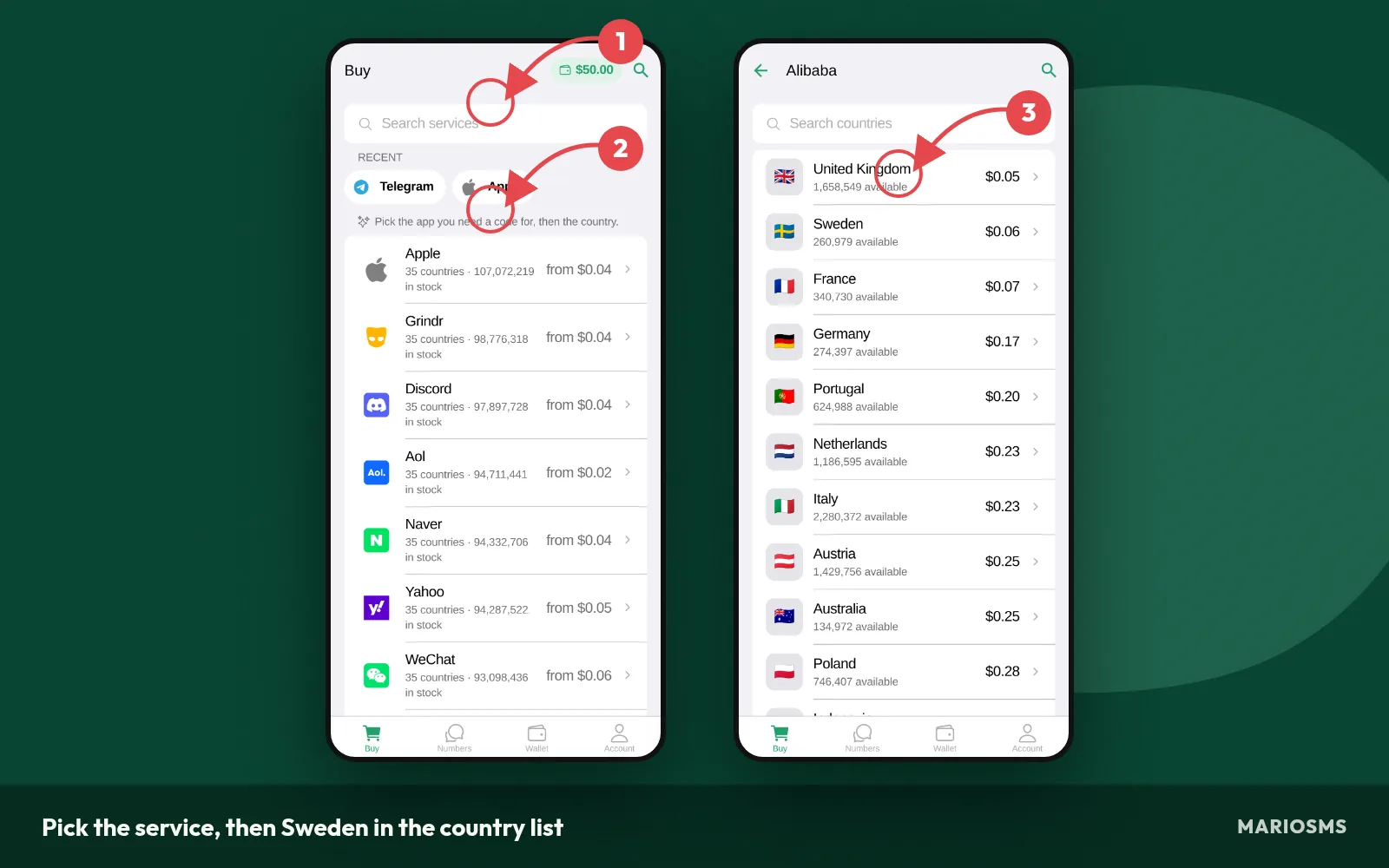
Pick the service, then Sweden in the country list
- Top up your balance. Add funds by card or crypto. Prices start at $0.04 per number and depend on the service and country, so a small top-up covers several activations.
- Pick the service. Search for the app or site you are signing up for. Each service has its own price and stock level in each country.
- Choose Sweden. Open the country list and select Sweden (+46). The price next to it is what one activation costs. The Sweden numbers page shows current stock and prices for each service.
Steps 4 to 5: use the number before the timer runs out
When you confirm, the app reserves a real Swedish mobile number for you and starts the activation window. The screenshot shows a reserved +46 number with its timer counting down. The number is yours for this one verification until that timer ends.
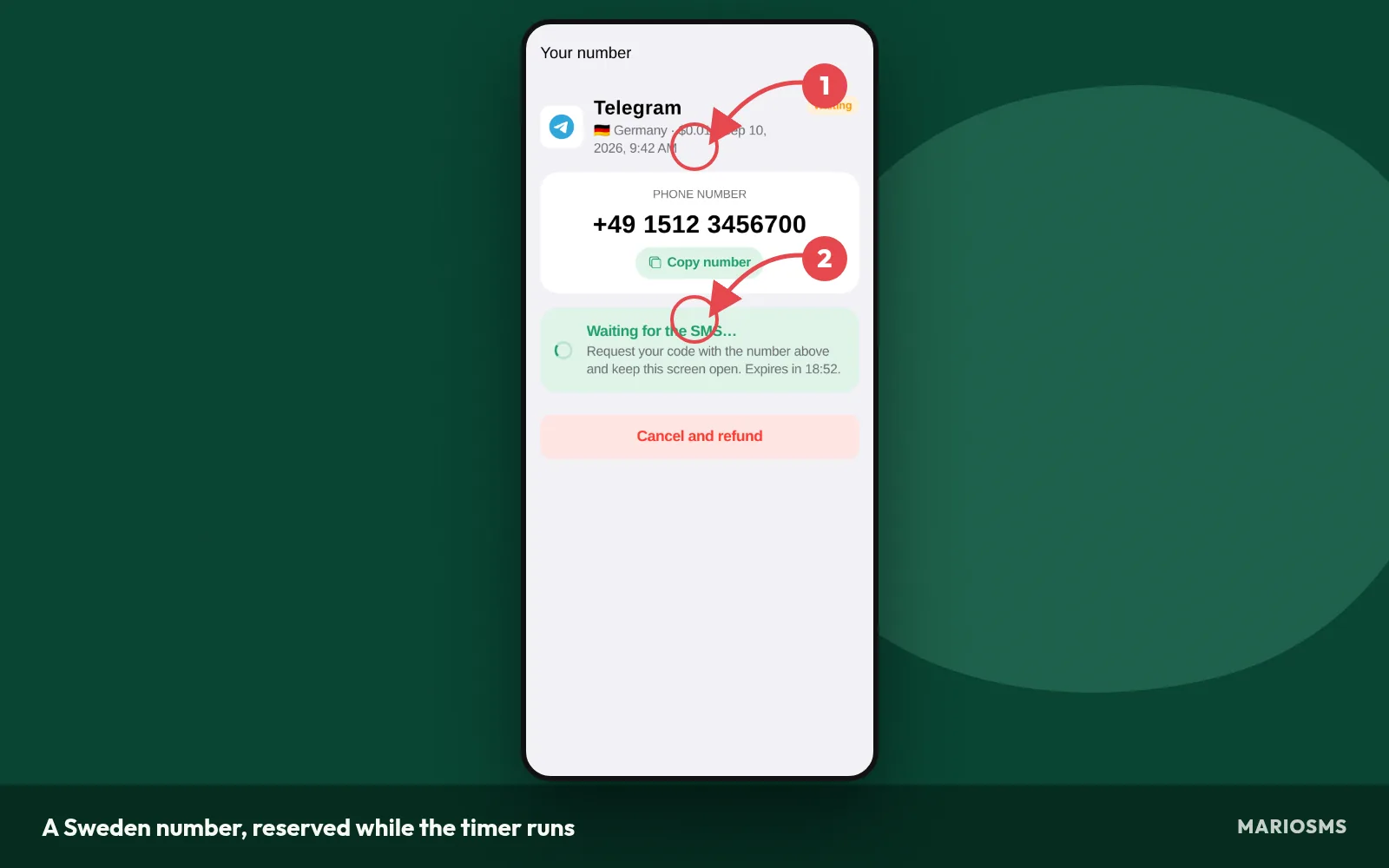
A Sweden number, reserved while the timer runs
- Copy the number. Tap the number to copy it. Some sign-up forms accept the full +46 format. Others ask you to choose Sweden from a dropdown and then enter only the remaining digits. Match the format the form asks for, or the SMS may never be sent.
- Request the code. Paste the number into the service’s sign-up or phone field and trigger the SMS straight away. The code has to arrive before the timer runs out, so request it right after you reserve the number.
Step 6: copy the code and finish the sign-up
The SMS appears on the same screen in the app or dashboard, usually within a minute. You don’t need a separate inbox and you don’t have to reload the page. In the screenshot, the code has arrived and is ready to copy.
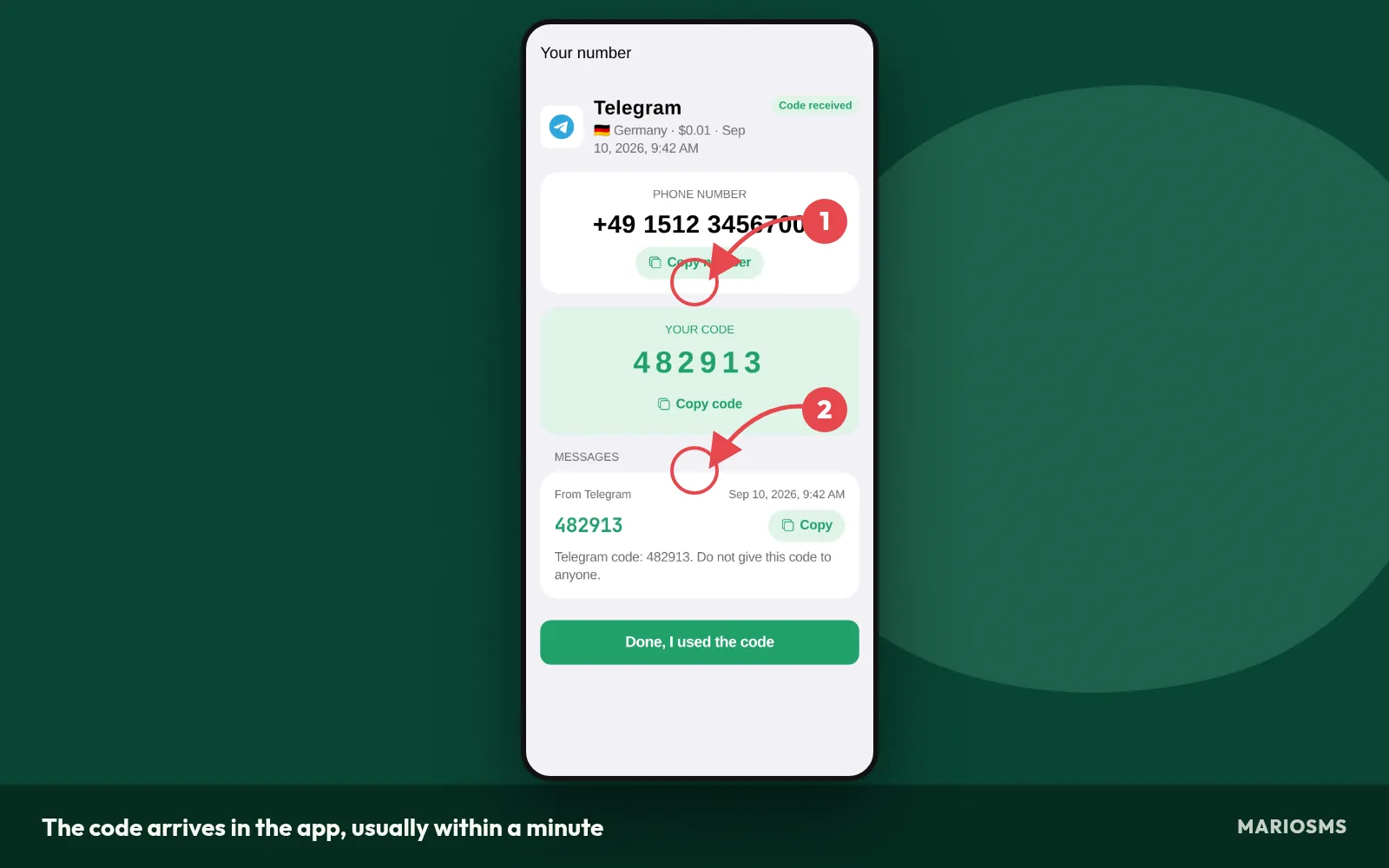
The code arrives in the app, usually within a minute
- Copy the code and enter it. Paste the one-time code into the service before it expires. Many services only accept a code for a few minutes, so switch back to the form right away. Then complete the rest of the sign-up, such as the password and profile details, before you close the tab.
If the timer ends before any SMS arrives, the activation cancels and the price goes back to your balance automatically. A failed attempt costs nothing, and you can try again with a new number. QA teams that run many Swedish OTP tests can do these six steps through the REST API, which has examples in Python, Node.js, Go and PHP.
Which services have Sweden numbers in stock, and what do they cost?
Sweden stock changes during the day, because each number is rented for one verification at a time and then leaves the pool for that service. The table below lists the cheapest Sweden numbers today, with the price per number and how many numbers each service has in stock right now.
Cheapest Sweden numbers today
| Service | Price | Numbers in stock |
|---|---|---|
| $0.06 | 7,746,375 | |
| $0.06 | 7,589,955 | |
| apple | $0.06 | 6,385,795 |
| KakaoTalk | $0.06 | 4,364,741 |
| Fiverr | $0.06 | 3,955,810 |
| baidu | $0.06 | 2,525,579 |
| PayPal | $0.06 | 2,093,208 |
| Yemeksepeti | $0.06 | 1,919,202 |
Source: MarioSMS catalog, 2026-09-27. Price per number, stock in brackets.
The most stocked services for Sweden
Stock is counted per service, not per country. A Swedish number that has already received a code from one service can still be unused for another. That is why the same country can show hundreds of numbers for one app and only a few for the next. Check the live counts on the Sweden numbers page before you top up.
A high count helps when you retry. With plenty of stock, you can drop a slow number and rent another one straight away. The retry costs nothing extra, because an activation that never receives an SMS is refunded to your balance.
The cheapest Sweden numbers today
MarioSMS prices start at $0.04 per number, but a Swedish number for a given service can cost more than that. Each service and country pair has its own price, set by supply and demand. If a service sees many sign-ups, or turns away numbers it has already seen, fresh numbers run out faster and the price goes up.
You pay only when a code arrives. If the activation window closes with no SMS, the charge goes back to your balance automatically. A cheap number that fails once costs you a few minutes and no money.
When a different country from the 35+ in stock makes more sense
Choose Sweden when the service checks for a +46 country code, such as a Swedish-only app or a regional account setting. If the service accepts any European number, a nearby country may be cheaper or have more stock that day.
| Situation | Better choice |
|---|---|
| Service requires a +46 number | Sweden |
| Service accepts any EU number and Sweden stock is low | A nearby country with more numbers in stock |
| Sweden costs much more than a neighbor for the same service | Compare Finland or Ireland first |
The Finland guide walks through the closest alternative with the same steps.
Automating Sweden numbers for QA and OTP testing through the API
QA teams that test Swedish sign-up flows can use the REST API to run the whole process without the app. The docs include examples in Python, Node.js, Go and PHP.
- Look up the Sweden price and stock for the service under test.
- Rent a number and send it to the phone field of your test form.
- Poll for the SMS and feed the OTP into your test run.
- If no code arrives, let the timer run out so the price returns to the balance, then rent the next number.
A test suite that runs 50 Swedish OTP checks is charged only for the codes that actually arrive.
What should you do when no SMS arrives on your Sweden number?
A missing code usually has one of three causes. The number was entered in the wrong format, the service throttled repeated requests, or the service stopped accepting that number. Work through the routine below in order. A failed number activation costs nothing, because the price goes back to your balance when the timer ends.
In the screenshot, the timer has reached zero, the activation is marked as cancelled, and the balance is back up by the exact price of the number. You don’t need to open a ticket or contact support. The refund happens on its own.
Check the number format and country code you entered
Most failed deliveries start in the phone field of the service you’re signing up for. Check these four things before you wait for anything.
- Select Sweden (+46) in the country dropdown, not Finland (+358) or Norway (+47), which often appear right next to it.
- If +46 is already selected, enter only the national digits. Pasting “+46” again can turn it into a different number.
- Drop the leading 0 that Swedish mobile numbers show in domestic format. For example, 07X becomes +46 7X.
- Remove spaces or dashes if the form rejects them, and confirm the form showed a “code sent” message.
Request the code once, then wait for the window
Tapping “resend” five times in a row can trigger a rate limit on the service’s side, and some services then refuse that number for further attempts. Send the request once. Keep the MarioSMS app or the dashboard at app.mariosms.com open. Most codes arrive within a minute. If nothing appears after two or three minutes, one resend is reasonable.
Let the timer expire and try a fresh number
If the window is nearly over and still no SMS verification code has come in, the service has probably seen that number before or isn’t delivering to it right now.
- Leave the activation alone until the timer runs out.
- Rent a new number for the same service from the Sweden numbers page.
- Start the sign-up again from the phone step, in a fresh form if possible.
- If two numbers in a row fail, try again later or choose another country the service accepts.
How the automatic refund works
Every rented number comes with an activation window. If no SMS arrives before it closes, the activation cancels itself and the full price goes back to your MarioSMS balance automatically. For example, a $0.04 number that never receives a code is charged for a few minutes, then refunded to $0. Trying a second Sweden number costs only that second number’s price.
What are the legitimate limits of a rented Sweden number?
Acceptable uses and what is off limits
A rented Sweden number is meant for one verification. MarioSMS allows three kinds of use, described in the acceptable use policy:
- Privacy hygiene. You can sign up for a Swedish marketplace, forum or delivery app without adding your personal SIM number to another database that could leak or be sold to marketers.
- Second accounts for legitimate reasons. For example, a separate profile for a side project, a work persona, or a shop you run apart from your personal account.
- QA and OTP testing. Developers can check that a signup flow sends a code to a +46 number, displays it correctly and accepts it before the timeout. The REST API, with examples in Python, Node.js, Go and PHP, lets a team run the same test many times.
Two uses are not allowed. You may not use a number to get around a ban or suspension a service has placed on you. You may not use one to pose as another person or business. An account created for either purpose breaks the policy, and the service that banned you can still remove the new account.
Why a one-time number is a poor fit for account recovery
A temporary phone number belongs to you only for one activation window. After the code arrives and the window closes, you cannot receive another SMS on that number. The service may send a code six months later for a password reset, a login from a new device or two-factor authentication. That message goes to a number you no longer have access to.
For any account you plan to keep, do this after signing up:
- Add your own phone number or an email address you control as the recovery method.
- Switch two-factor authentication to an authenticator app if the service supports it.
- Save the service’s backup codes in a password manager.
- Remove the rented number from the account settings once another method works.
If the rented number is the only recovery contact on an account, forgetting your password once is enough to lose the account.
Sweden phone number for SMS: frequently asked questions
Is a rented Sweden number a real mobile number?
Yes. MarioSMS rents real mobile numbers, not lines generated inside a calling app. This matters because many sign-up forms check the number type and reject VoIP ranges. A Swedish mobile number uses the +46 country code followed by a 7, the same format as a local SIM card. See non-VoIP numbers for how that check works.
How much does a Sweden number for SMS cost?
Prices start at $0.04 per number. The Sweden price depends on which service you need the code for, so two sign-ups can cost different amounts. The Sweden numbers page shows the current price next to each service before you pay. You pay for one activation at a time, and the price comes out of your MarioSMS balance.
How long do I have to receive the code?
Every number has a timer, called the activation window, and the app and dashboard show it counting down. Most codes appear within a minute of the service sending them. Request the code on the service’s side as soon as you rent the number. If you fill in the rest of the form first, you use up part of the window before the code is even sent.
Can I receive more than one SMS on the same number?
Plan for one. Each rental covers a single verification, so one number handles one code for one sign-up. If a service asks you to confirm again later, or you need to verify a second account, rent a new number for that step. Give each account its own number so a later check on one account doesn’t depend on another account’s number.
Do I get my money back if the code never arrives?
Yes. If no SMS arrives before the timer runs out, the activation cancels and the price goes back to your balance automatically. You don’t need to open a ticket or contact support. You can spend the refunded amount on the next attempt right away, such as another Sweden number for the same service or a number from a different country.
Can I use the same Sweden number again later?
Don’t count on it. Numbers are rented for one verification at a time, and once the activation ends you no longer have access to that number. That is why you should add your own phone or email as the recovery method after signing up. If the service sends a login check to the rented number weeks later, it won’t reach you.
Can developers request Sweden numbers through an API?
Yes. MarioSMS has a REST API with code examples in Python, Node.js, Go and PHP. A QA team can request a Sweden number for a specific service from a test script, read the incoming code and pass it into an automated OTP test, all without opening the app. Top up the balance by card or crypto before a test run so requests don’t fail partway through.