How to Get a Philippines Phone Number for SMS
Rent a real Philippines mobile number in MarioSMS for one verification, enter it in the sign-up form, and read the code in the app or dashboard. The code usually arrives within a minute. Prices start at $0.04 per number and vary by service. If no SMS arrives before the timer runs out, the activation cancels and the price goes back to your balance automatically.
In practice, you only pay for a number that actually receives a code. Each rental is one number activation for one service. Its activation window shows on screen, so you can see how long the number stays reserved for you. You can do this in the iOS or Android app or in the web app at app.mariosms.com. All three show the same balance and the same incoming codes.
Who needs a +63 number
- Travellers heading to Manila, Cebu or Davao who want to set up a local app account before landing, without buying a SIM at the airport.
- Expats and Filipinos abroad who keep a foreign SIM in their phone but need a +63 number for one Philippine service.
- Remote teams that give a Philippines-based colleague a separate work account, so it stays apart from their personal one.
- QA testers checking that an OTP flow accepts +63 input, handles the 10-digit national format (9XX XXX XXXX) and sends the message on time.
What you need before you start
- A balance. Top up by card or crypto. At $0.04 and up per number, a few dollars covers several attempts.
- The service name. Search for the app or site exactly as it is listed, because prices and stock are set per service.
- Five minutes. Open the sign-up form in another tab or on a second device so you can paste the number and the code without switching screens.
To see current stock and prices before you top up, open the Philippines numbers page.
Why do sign-up forms check the country of your phone number?
On a sign-up form, the phone number field tells the service more than any other field. The country code shows which market the account belongs to. The digits after it show what kind of line it is. Services check both before they send a code, and many decide at that point whether to send one at all.
What the +63 prefix and the mobile range tell a service
A Philippine mobile number is written as +63 9XX XXX XXXX. That is the country code followed by a 10-digit national number starting with 9. Landlines use area codes instead, such as 2 for Metro Manila. When a form sees +63, it can switch the interface language, show prices in pesos, turn on features that only exist in that region and apply the fraud rules set for that market. The leading 9 tells the system the line is mobile and can receive SMS. Most services confirm this with a number lookup database, which returns the country, carrier and line type in under a second.
Why real mobile numbers work where VoIP numbers get rejected
VoIP numbers are cheap to create in bulk, so many platforms treat them as higher risk. If the lookup returns “VoIP” or “fixed line”, the form may refuse the number, skip the SMS without telling you or ask for a different one. A number that a mobile carrier issued to a physical SIM comes back as “mobile”, and that is the line type most SMS verification flows expect.
| Number type | What a lookup returns | Typical result at sign-up |
|---|---|---|
| Mobile (carrier SIM) | Mobile, carrier name | Code sent by SMS |
| VoIP | VoIP or non-fixed | Often rejected, or no SMS arrives |
| Landline | Fixed line | Rejected for SMS, sometimes a voice call is offered |
MarioSMS rents real mobile numbers, so the lookup returns the same line type as it would for a SIM bought in Manila. The glossary entry on non-VoIP numbers explains the difference in more detail.
When a Philippines number matters (local apps, regional content, team accounts on the ground)
A +63 number makes sense in three situations:
- Local apps. Some food delivery, ride-hailing and marketplace apps only take Philippine numbers at sign-up and hide the country picker entirely.
- Regional content. Some services set the account’s region, catalog and pricing from the phone number, not from your IP address.
- Team accounts on the ground. A company with staff in Cebu may want a separate account for each location. A QA team may need to confirm that one-time codes reach +63 numbers before a product launches in the Philippines.
For the QA case, a single rented number per test run shows whether the SMS arrives and how long it takes, measured in seconds from tapping “Send code”.
How do you rent a Philippines number in the MarioSMS app, step by step?
Steps 1 to 3: top up, pick the service, choose Philippines
The process is the same on iOS, Android and the web app at app.mariosms.com. First you add funds. Then you pick the service you are signing up for, and then you pick Philippines as the country. The screenshot shows the service search and the country list with the +63 entry.
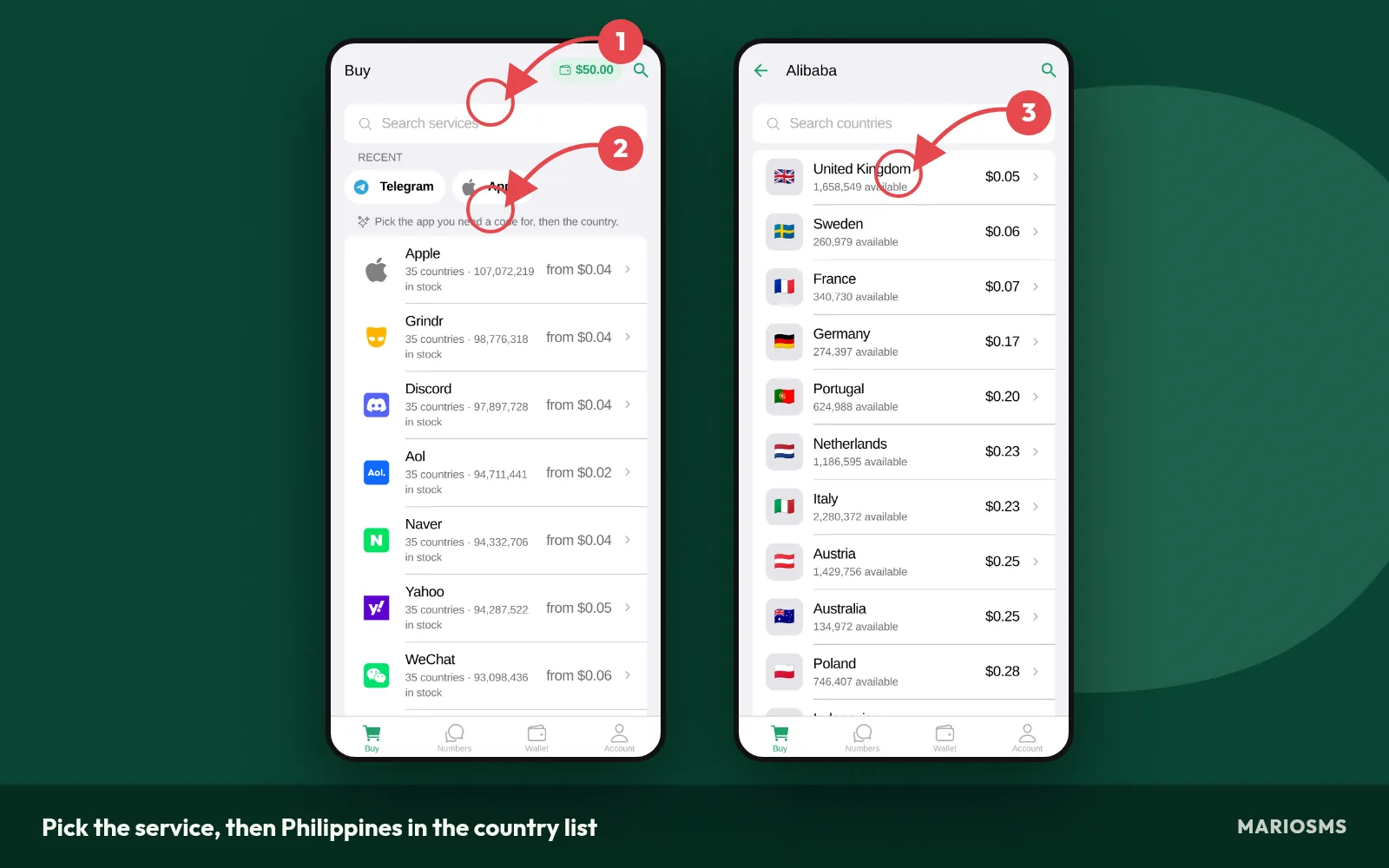
Pick the service, then Philippines in the country list
- Top up your balance. Pay by card or crypto. Prices start at $0.04 per number, so a small top-up covers several attempts.
- Pick the service. Search for the app or site that will send the code. The price depends on the service and the country, so pick the service first.
- Choose Philippines. Search the country list for Philippines (+63). The price shown is the cost of one activation. You can check current stock for each service on the Philippines numbers page.
Steps 4 to 5: reserve the number and enter it while the timer runs
When you tap the price, you reserve a real mobile number for one verification. A timer starts at that moment. It is your activation window. The screenshot shows a reserved Philippines number with the countdown running. Keep this screen open while you fill in the sign-up form.
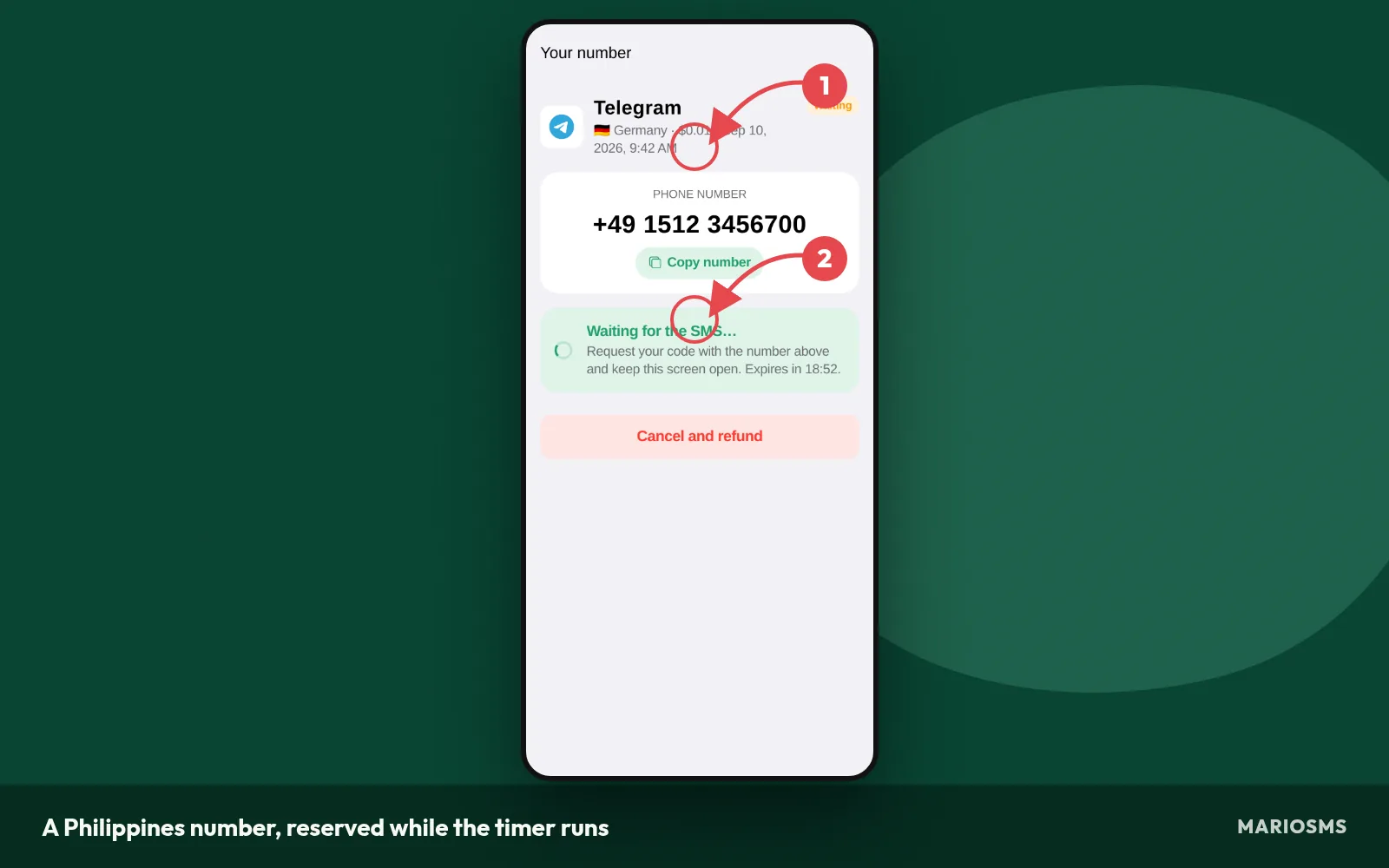
A Philippines number, reserved while the timer runs
- Reserve the number. Tap to rent it. The number appears with a copy button and the timer. The price comes off your balance, and you get it back if no SMS arrives.
- Paste it into the sign-up form. Copy the full number and select Philippines or +63 in the form’s country picker. Check that the form did not add the country code twice. Then tap “Send code” once, well before the timer ends.
Step 6: copy the code, usually within a minute
When the service sends the SMS, the code shows up in the app or dashboard, usually within a minute. You do not need to refresh or reload anything. The screenshot shows a received code next to the Philippines number it arrived on, with a button to copy it.
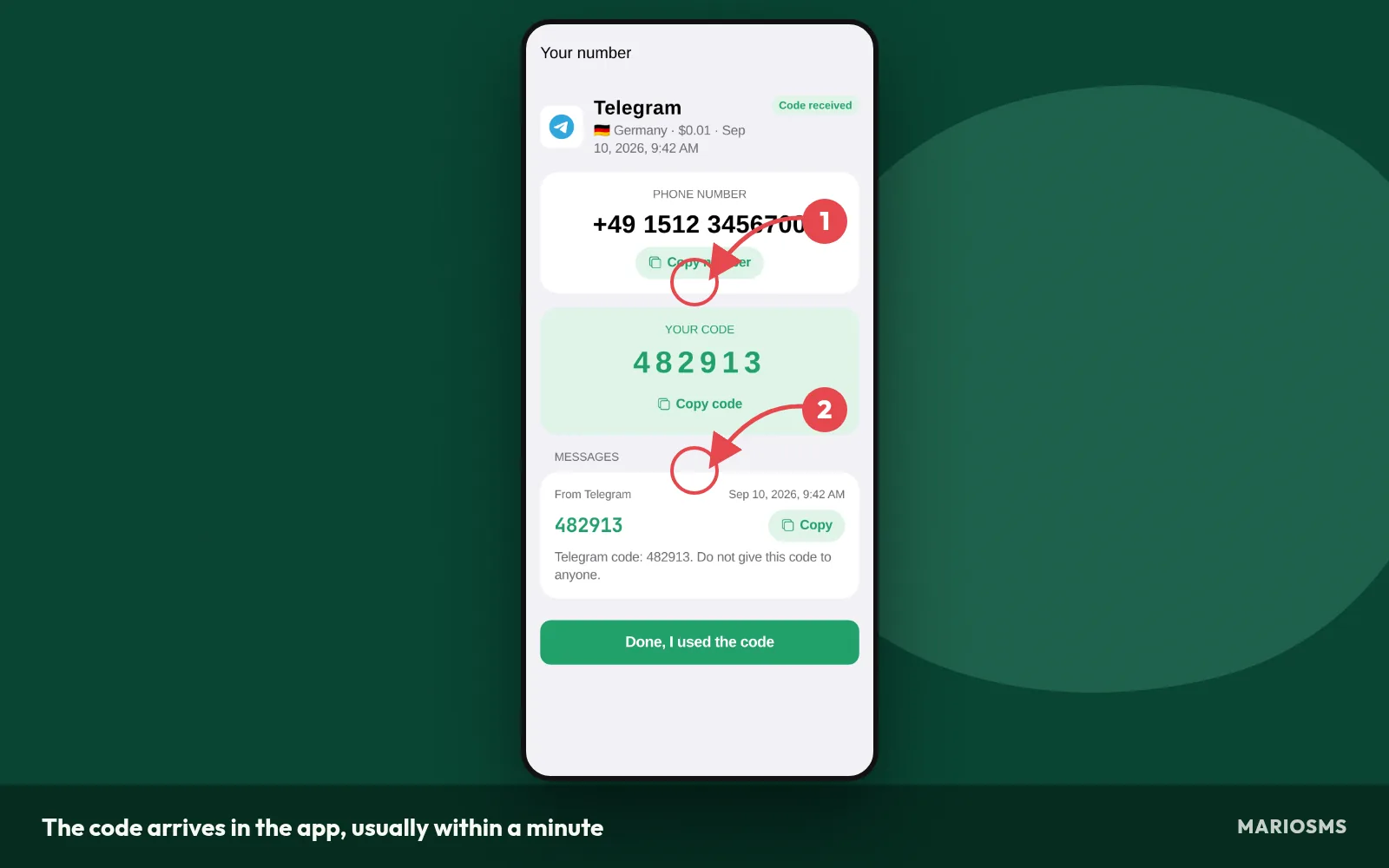
The code arrives in the app, usually within a minute
- Copy the code. Tap to copy it, go back to the sign-up form and paste it. A one-time code (OTP) often expires soon after it is sent, so enter it right away rather than finishing the rest of the profile first.
What happens if the timer ends with no SMS (automatic refund to your balance)
Sometimes the service never sends the code, or the code comes after the window has closed. In that case the activation cancels when the timer reaches zero. The price goes back to your balance automatically, so you don’t need to open a ticket or contact support. The image below shows how the refund appears.
After the refund, your balance is back where it was before step 4. You can return to step 3 and reserve a new Philippines number for the same service. Before you try again, check that the form had +63 selected and that the number was pasted without extra digits. One wrong digit uses up the whole window.
Which services have Philippines numbers in stock today, and what do they cost?
Most stocked services for Philippines numbers
Each service keeps its own stock of Philippines numbers, so a +63 number for one app is a separate listing from a +63 number for another. The table below lists the services with the most Philippines numbers available right now and today’s price for each. The live figures are on the Philippines numbers page.

Cheapest Philippines numbers today
The price depends on two things: the service you pick and the country of the number. The same +63 number can cost less for one app than for another, because demand and delivery rates differ between services. The next table shows the lowest-priced Philippines listings today. Across MarioSMS, prices start at $0.04 per number.
Philippines numbers: most stocked services
| Service | Price | Numbers in stock |
|---|---|---|
| apple | $0.17 | 9,582,377 |
| Yahoo | $0.10 | 8,780,767 |
| PayPal | $0.72 | 2,826,143 |
| Discord | $0.20 | 2,257,623 |
| Netflix | $0.27 | 2,098,564 |
| imo | $0.18 | 2,073,086 |
| airbnb | $0.27 | 1,977,431 |
| bigolive | $0.12 | 1,904,612 |
| grindr | $0.11 | 1,871,747 |
| wise | $0.23 | 1,813,637 |
| eBay | $0.28 | 1,810,172 |
| careem | $0.33 | 1,712,956 |
Source: MarioSMS catalog, 2026-09-28. Price per number, stock in brackets.
When a different country is the better choice
You only need a Philippines number if the service checks for +63. If the sign-up form accepts any country code, another one of the 35+ countries in stock may have more numbers or a lower price for the same service. The screenshot shows the Philippines listing to compare against.
Cheapest Philippines numbers today
| Service | Price | Numbers in stock |
|---|---|---|
| proton | $0.08 | 1,119,188 |
| zoho | $0.08 | 879,976 |
| aol | $0.09 | 1,260,916 |
| Microsoft | $0.10 | 1,697,422 |
| Signal | $0.10 | 1,493,262 |
| Yahoo | $0.10 | 8,780,767 |
| $0.10 | 1,629,098 | |
| grindr | $0.11 | 1,871,747 |
Source: MarioSMS catalog, 2026-09-28. Price per number, stock in brackets.
In three cases, pick a different country:
- The service shows zero or very low Philippines stock.
- Two Philippines activations in a row ended without an SMS.
- Another country lists the same service at a lower price, and the form accepts that country code.
Every other country works the same way. The Sweden guide follows the same steps, with a timer on each number and a refund if no code arrives. Keep the Philippines number when the account’s region, app store or content settings need to match a +63 number.
Running Philippines OTP tests through the REST API (Python, Node.js, Go, PHP)
QA teams testing OTP flows can rent Philippines numbers from code instead of the app. The MarioSMS REST API comes with examples in Python, Node.js, Go and PHP. It follows the same rules as the dashboard: one number per verification, a timer on each number and an automatic refund when no SMS arrives.
A typical test run has five steps:
- Request a Philippines number for the service you are testing.
- Enter the number in your staging sign-up form with +63 selected.
- Poll the activation until the code arrives, which usually takes under a minute.
- Submit the code and log the result, including how long delivery took.
- Let unused activations run out so their price goes back to your balance.
Use one number for each test case. When a code fails, you can then trace it to one activation and one timer, not to a batch of numbers that were shared across several tests.
What should you do when no SMS arrives on your Philippines number?
Most missing codes come from one of a few small mistakes, and each one takes seconds to check. Go through these steps in order before you spend anything on a second number.
- Confirm the number is entered as +63 followed by 10 digits, with no leading 0.
- Confirm the service you rented for is the exact app or site sending the code.
- Press resend in the sign-up form once.
- Let the activation timer run out if nothing arrives.
- Use the automatic refund to rent a fresh number, or retry at a different time.
Check the number format: +63 then 10 digits, no leading 0
Philippine mobile numbers are written locally as 11 digits starting with 09, for example 0917 123 4567. In international format the 0 is dropped, so the same number becomes +63 917 123 4567. If the form has a country picker set to +63 and you paste 0917…, some forms send the code to a number that does not exist. Type only the 10 digits that start with 9. If the form has a single field, paste the full +63 version and check that the country flag did not change.
Did you pick the exact service the code comes from?
Each number activation is tied to one service. Pick the exact name of the app or site you are signing up for, not a related product from the same company. If you chose the wrong one, leave that activation alone until it expires and rent again under the correct service.
Resend once, then let the timer run out
Codes usually arrive within a minute. If nothing shows after 60 to 90 seconds, press resend in the sign-up form one time. Many services rate-limit repeated requests to the same number, and pressing resend over and over can pause delivery to that number for a while. After one resend, keep the form open and watch the activation timer in the app or dashboard.
Try a fresh number after the automatic refund
If the timer ends and no SMS has arrived, the activation cancels and its price goes back to your balance automatically. You don’t need to contact support or file a ticket. From there, you have two options.
- Rent a new +63 number for the same service from the Philippines numbers page. A different number can go through a different delivery route.
- Wait 30 to 60 minutes before trying again, because the service may be temporarily throttling codes to Philippine numbers.
Before you enter the fresh number, check its format again, because a leading 0 will stop the new code just as it stopped the first one.
What are the legitimate limits on using a rented Philippines number?
A rented +63 number handles one verification at a time. MarioSMS sets out the rules in its acceptable use policy. The policy allows three purposes and forbids two. It also leaves one practical limit that catches people months after sign-up.
Allowed uses: privacy, second accounts, testing
- Privacy hygiene. You keep your personal SIM off the sign-up form of a marketplace, forum or delivery app you may only use once. That way your real number stays out of its database and off its marketing lists.
- Second accounts for legitimate reasons. A seller who keeps a work profile separate from a personal one needs a second number to receive the code. So does a freelancer who runs a client’s social page.
- QA and OTP testing. Developers check three things for Philippine users: the one-time password arrives, the +63 format parses correctly, and the resend timer behaves. The REST API lets a test suite rent numbers and read codes without anyone tapping through the app.
Not allowed: evading bans or impersonating anyone
A fresh Philippines number is off limits as a way back into a service that has suspended or banned you. You also can’t create accounts that pose as another person, a brand or an organization. Both break the MarioSMS policy, and both usually break the target service’s terms as well.
Why a one-time number is a bad recovery number
Each number is yours only for its activation window. Once that timer runs out, you can’t receive texts on it anymore. Six months later the service might send a code for a password reset or a login from a new device, and you won’t get it. For any account you plan to keep, open the two-factor authentication settings right after sign-up and add a number you own or an authenticator app. Then remove the rented number.
Philippines phone number for SMS: frequently asked questions
These are common questions people ask before renting a +63 number. Each answer stands on its own, so you can jump to the one you need. The Philippines numbers page shows current prices and stock for each service.
How much does a Philippines number for SMS cost?
MarioSMS prices start at $0.04 per number. The exact price of a +63 number depends on the service you’re verifying, because rates vary by service and by country. Each rental covers one verification and is paid from your balance, which you top up by card or crypto. If no code arrives, the price goes back to your balance.
How fast does the verification code arrive?
Usually within a minute. After you request the code on the service’s sign-up form, the SMS goes to the rented +63 number and shows up in the MarioSMS app or web dashboard. You don’t insert a SIM or check a phone. If nothing appears yet, the timer is still running, so you can ask the service to resend.
Do I pay if the SMS never comes?
No. Every number comes with a timer, called the activation window. If no SMS reaches the number before the timer ends, the activation cancels and the price is refunded to your balance automatically. You don’t need to open a ticket or contact support. You can then rent a new +63 number or try another country for the same service.
Can I receive more than one code on the same number?
Each MarioSMS rental covers one verification. You get the number and receive the code for that sign-up, and the activation ends when its timer runs out. If you need another code later, for a new account or a second test run, rent a new number. Don’t keep a rented number as the recovery phone for any account.
Can I use the number from outside the Philippines?
Yes. The number is a real Philippine mobile line, and you read the SMS remotely, so you don’t need to be in the Philippines or own a Philippine SIM. Open the MarioSMS app on iOS or Android, or the web app at app.mariosms.com, from any country. The code appears there, and the sign-up form sees a +63 number.
Is there an API for testing Philippines OTP flows?
Yes. MarioSMS has a REST API with example code in Python, Node.js, Go and PHP. A QA script can rent a +63 number, trigger your app’s OTP request, then fetch the code and check it. That test confirms two things: your SMS sender reaches Philippine numbers, and your verification screen accepts the code within the timeout you set.