How to Get a Romania Phone Number for SMS
To get one, rent a real Romanian mobile number in MarioSMS for a single verification. The code shows up in the app or dashboard, usually within a minute. Prices start at $0.04 and depend on the service. If no SMS arrives, the price goes back to your balance automatically. The table below lists today’s cheapest Romania options.

You choose the service, set the country to Romania, and the app gives you a +40 number with a timer already running. Paste that number into the sign-up form, wait for the text, then copy the code into the form. The screenshot shows a Romanian number waiting for its code.
Cheapest Romania numbers today
| Service | Price | Numbers in stock |
|---|---|---|
| aol | $0.09 | 771,181 |
| Discord | $0.10 | 949,821 |
| noon | $0.10 | 406,411 |
| POF | $0.10 | 280,674 |
| Yahoo | $0.12 | 522,842 |
| Microsoft | $0.14 | 479,135 |
| grindr | $0.16 | 1,007,154 |
| bigolive | $0.19 | 1,312,703 |
Source: MarioSMS catalog, 2026-10-04. Price per number, stock in brackets.
What you get with a rented +40 number
Each rental covers one number activation, meaning one service and one code within a fixed activation window. The number belongs to a real Romanian mobile line. It is not a VoIP or app-based number, which matters because some sign-up forms check the line type as well as the +40 prefix.
You can rent and read codes in the iOS app, the Android app or the web app at app.mariosms.com. Developers and QA teams can do the same through the REST API, which has examples in Python, Node.js, Go and PHP. That makes it practical to test a Romanian OTP flow without buying a local SIM card.
What a Romania number costs today
Romania prices start at $0.04 per number. The exact price depends on which service you verify, since numbers for some sign-up forms are in shorter supply than others. Stock and prices change during the day, so the Romania numbers page shows current figures for every service before you spend anything.
You pay only when a code arrives. If the timer runs out with no SMS, the activation cancels and the full price returns to your balance without a support ticket. You top up the balance by card or crypto, and a $1 top-up covers up to 25 rentals at the $0.04 starting price.
Why do sign-up forms check which country your number is from?
A sign-up form treats your phone number as a location signal. Before it sends a code, the service parses the number, works out the country and line type, and compares the result with what it already knows about your device. If the signals agree, the code goes out. If they clash, you can get extra checks, a slow SMS or a refused sign-up.
How a service reads the country code and number type
Romanian numbers start with +40. Mobile numbers then begin with a 7 and have nine digits after the country code, so a full mobile number looks like +40 7XX XXX XXX. Geographic landlines start with 2 or 3. A number lookup tells the service which range a number belongs to before the form even sends a code.
The service then checks the prefix against other signals it collects:
| Signal | What the service reads | Agrees with a +40 number when |
|---|---|---|
| App store region | Country set on your iOS or Android account | The store is set to Romania |
| IP address | Approximate location of your connection | You connect from Romania |
| Language and locale | Device language, region format, time zone | Time zone is Europe/Bucharest |
| Phone prefix | Country code and line type | +40 followed by a mobile range |
When a Romania number matches your situation (travel, relocation, a local team)
Say you spend three weeks in Cluj. Your phone connects from a Romanian IP, and local apps expect a +40 number to match it. An expat who moves to Bucharest often switches the app store region on day one, weeks before a Romanian SIM contract is signed. A QA team testing an app’s Romanian release needs +40 numbers to confirm that the OTP arrives and that the localized sign-up screens behave correctly. In all three cases the number matches the IP and locale.
Why real mobile numbers work where virtual landlines get rejected
Many services block VoIP numbers and landline ranges because they cost almost nothing to create in bulk. When a lookup flags a number as VoIP, the form usually shows a generic “this number cannot be used” error and never sends a code. MarioSMS rents real mobile numbers, so the lookup returns the mobile line type the form expects, and the code shows up in the app or dashboard, usually within a minute.
How to get a Romania number in the MarioSMS app, step by step
Steps 1 to 3: top up, pick the service, choose Romania
The flow is the same on iOS, Android and the web app at app.mariosms.com, so start on whichever device you already use. The screenshot shows where you pick the service first and then Romania in the country list.
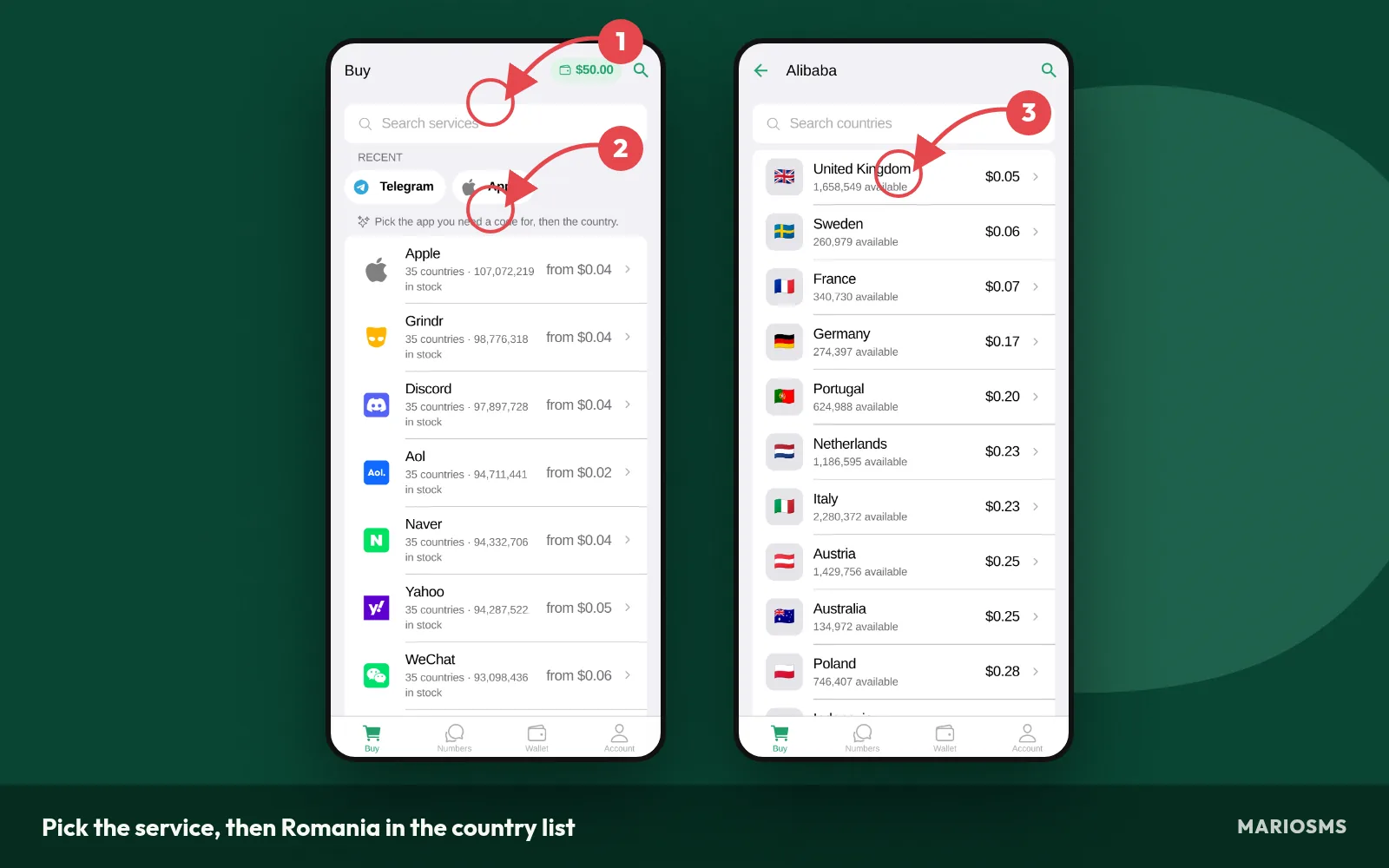
Pick the service, then Romania in the country list
- Top up the balance. Add funds by card or crypto. Prices start at $0.04 per number and depend on the service and country, so a small top-up covers several activations.
- Pick the service. Search for the app or site you are signing up for. Each rented number covers one verification for that service, so pick the exact one.
- Choose Romania. Select Romania (+40) in the country list. The price next to it is what this service costs in Romania. You can also check current stock on the Romania numbers page.
Steps 4 to 5: reserve the number and enter it before the timer ends
After you confirm, MarioSMS reserves a real Romanian mobile number and starts the timer, as in the screenshot. Open the sign-up form in another tab or app before you reserve. That way the timer runs while you wait for the code, and none of it goes to finding the form.
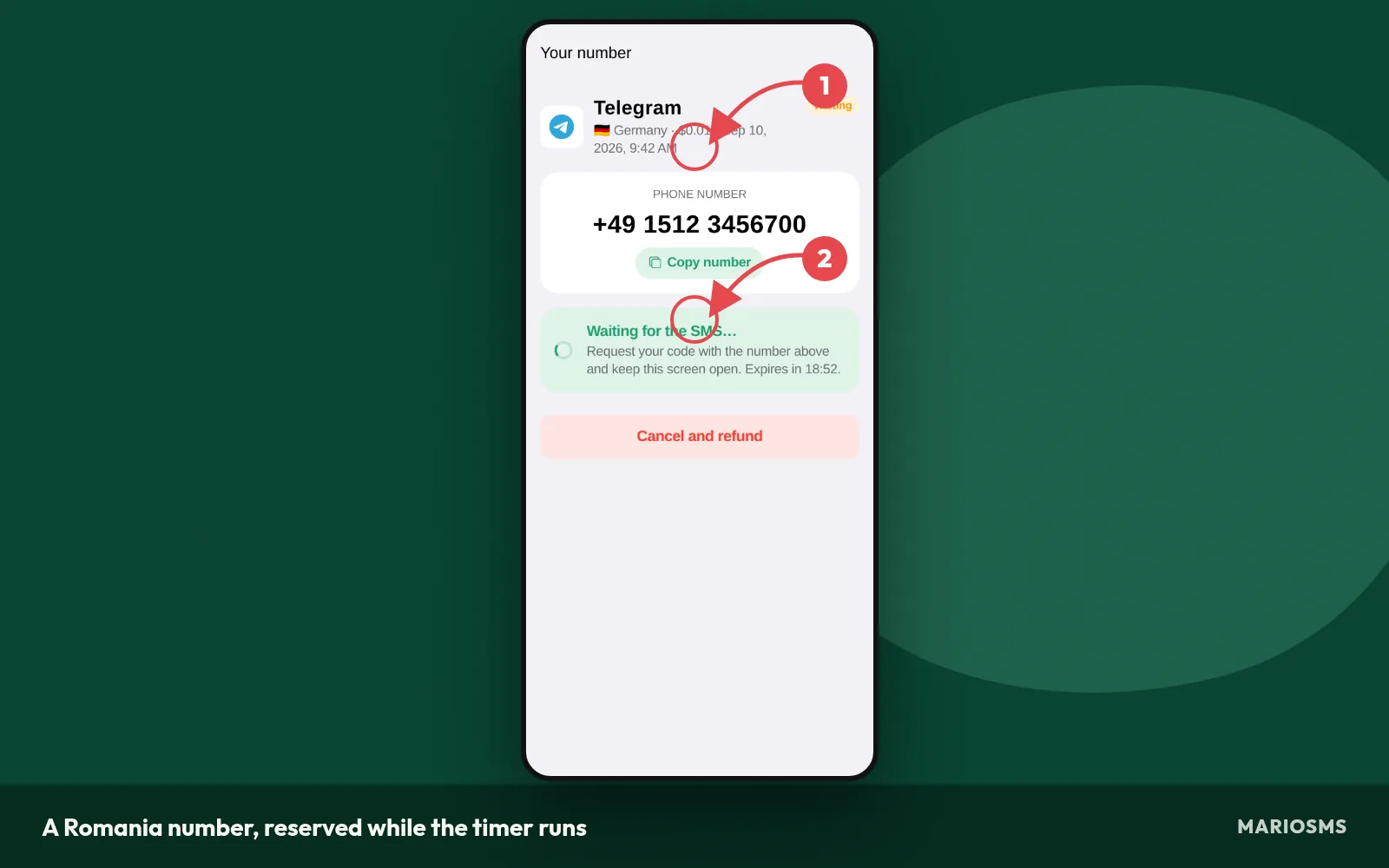
A Romania number, reserved while the timer runs
- Reserve the number. Tap or click to rent it. The +40 number appears with a countdown, which is the activation window.
- Enter it in the sign-up form. Copy the number and paste it into the phone field. If the form has its own country selector, set it to Romania and paste only the digits after +40, so the prefix is not entered twice.
Step 6: copy the code and finish the sign-up
When the service sends its SMS, the code appears in the app or dashboard, usually within a minute, as shown in the screenshot. Copy it from there and paste it into the verification field on the sign-up form.
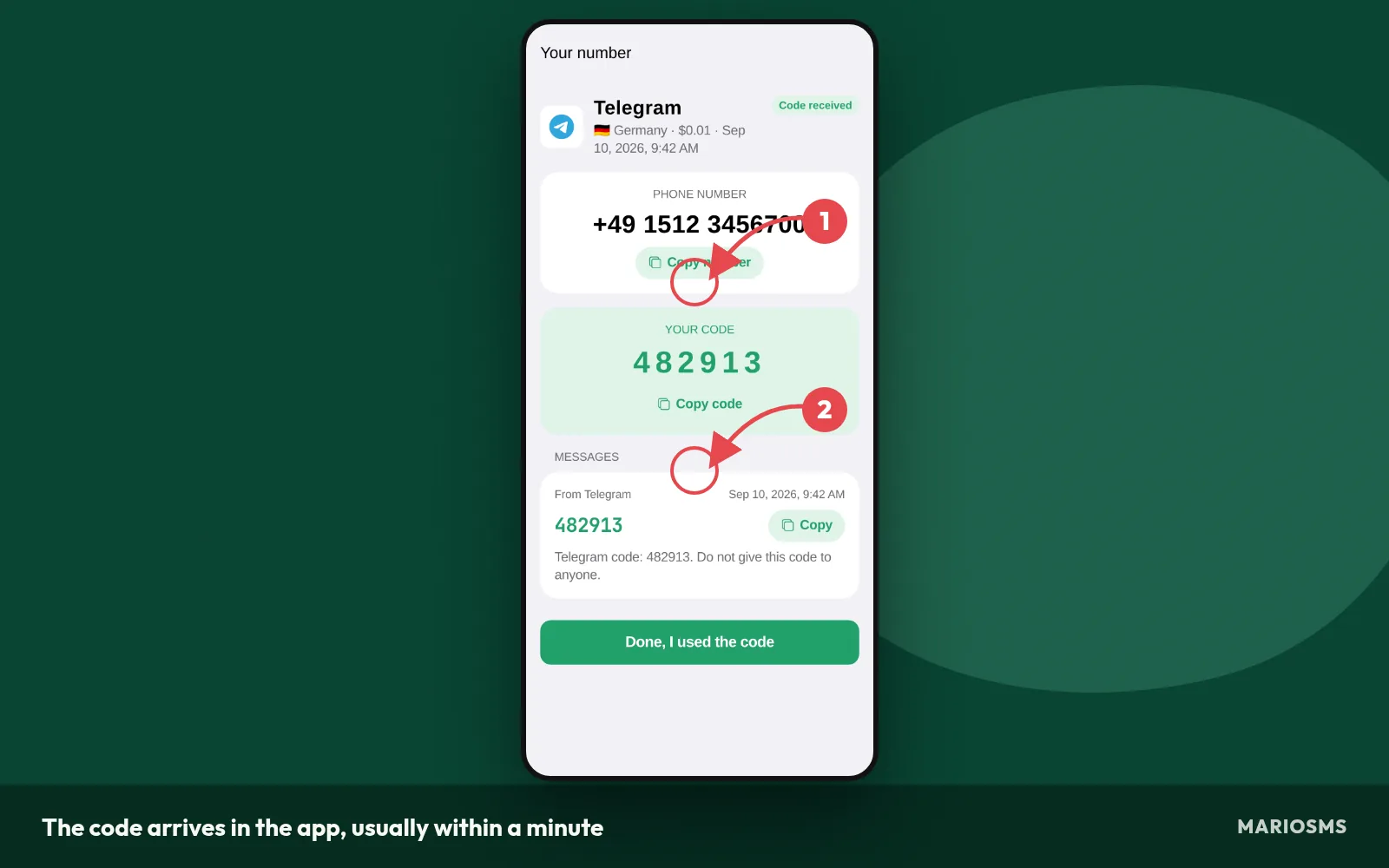
The code arrives in the app, usually within a minute
- Copy the code. Paste the one-time password and submit the form. If the timer ends and no SMS has arrived, the activation cancels and the price goes back to your balance automatically.
The service decides how long its code stays valid, and many expire within a few minutes. Paste the code as soon as it appears. If you wait too long, the service may reject a code that was correct.
Running the same flow through the REST API for QA teams
QA teams testing OTP flows can run these six steps from a script. The MarioSMS REST API has examples in Python, Node.js, Go and PHP, so a test suite can request numbers and read codes with no manual input.
- Request a Romania number for the service under test.
- Send the number to the sign-up form or staging endpoint you are testing.
- Poll for the code, then submit it and record the result.
If a test run gets no SMS before the timer ends, that activation is refunded automatically, so failed delivery tests do not cost anything.
Which services can you verify with a Romania number?
Romania numbers are stocked per service, so a +40 number available for one app may be sold out for another. The table below lists the services with the most Romania numbers in stock right now, with the price for each. Counts change through the day, so check the live list on /numbers/romania/ before you top up.
Romania numbers: most stocked services
| Service | Price | Numbers in stock |
|---|---|---|
| $0.22 | 8,303,717 | |
| baidu | $0.30 | 2,810,379 |
| eBay | $0.61 | 2,075,248 |
| airbnb | $0.72 | 1,684,891 |
| KakaoTalk | $0.53 | 1,577,333 |
| bigolive | $0.19 | 1,312,703 |
| Blizzard | $0.89 | 1,271,798 |
| zoho | $0.33 | 1,203,348 |
| Signal | $0.20 | 1,091,770 |
| grindr | $0.16 | 1,007,154 |
| Discord | $0.10 | 949,821 |
| aol | $0.09 | 771,181 |
Source: MarioSMS catalog, 2026-10-04. Price per number, stock in brackets.
Stock and price move because each number can be used once per service. When many people verify the same app, that service’s pool empties faster, and the price can rise until new numbers come in. Services that block numbers more aggressively also cost more, because fewer numbers pass their checks.
Messaging and social apps with deep Romania stock
Messaging and social apps usually top the stock list, because demand for them is steady and providers keep adding numbers. These are the apps people use for a second account, for example one for a side project or one that keeps a personal number off public profiles. Prices for this group start at $0.04 per number, depending on the app.
If you only need a one-time code to confirm a sign-up, a messaging app with deep stock is the most predictable choice. The code usually shows up in the app or dashboard within a minute. If no SMS arrives before the timer ends, the activation cancels and the price goes back to your balance.
Marketplaces, delivery and travel apps for life in Romania
People moving to Romania, studying there or staying for a long trip often need local apps: classifieds marketplaces, food delivery, ride-hailing and booking platforms. Some of these only accept a +40 number at sign-up, or show local listings only after you confirm one. Check the table for the exact service name, since regional versions of an app are often listed separately.
When Romania is out of stock for your service
A service showing zero Romania numbers is normal, and most gaps last hours, not weeks. You have two options:
- Check back later. Stock refills as new numbers arrive, often within the same day.
- Pick a nearby country, if the service accepts numbers from other countries. Serbia and other European countries in stock often work for apps that don’t require a Romanian number specifically.
Before switching, read the service’s sign-up rules. If it asks for a Romanian number to show local content or meet a local requirement, a number from another country will fail its check, so waiting for +40 stock is the only option that works.
What to do when no SMS arrives on your Romania number
Most missing codes come from one of four causes. The number was entered in the wrong format, a new code was requested too early, the sign-up form threw an error, or the service rate-limited the request. Check them in the order below. Each check takes about a minute and costs nothing extra.
If none of the checks help, you still lose nothing. In the screenshot, an activation that got no SMS before its timer ran out has cancelled itself, and the price is back in the MarioSMS balance. You don’t need to open a support ticket or ask for the refund.
Check the number format and the +40 prefix
- Pick Romania (+40) in the service’s country dropdown. Don’t type the prefix into the number field as well, or the form ends up sending to +40 40.
- Drop the leading 0. Romanian mobile numbers are written locally as 07XX XXX XXX. With the +40 prefix you enter only the nine digits that start with 7.
- Copy the number straight from the app or dashboard so you don’t swap two digits by hand.
Wait out the resend timer before requesting a new code
Most sign-up forms show a countdown before the “Resend code” button works again. If you click it early, or reload the page, the service can treat it as a fresh request and void the first code. Give the original SMS the full countdown, because carrier delivery sometimes lags. Then ask for one resend.
Try a fresh number if the service rejects the first one
The service may say the number is invalid, or block it after several attempts. That usually means it limits how often one number can verify, or it has already seen that number. Cancel the activation, rent another Romania number from /numbers/romania/, and start the form again from the beginning. Also check that the form shows no red error text next to the email or password fields, because a failed field can stop the SMS step from running at all.
How the automatic refund works when the timer expires
Every rented number comes with an activation window, shown as a timer. The number activation works like this:
- The timer starts as soon as you rent the number.
- If an SMS arrives, the code appears in the app or dashboard, usually within a minute.
- If no SMS arrives before the timer hits zero, the activation cancels.
- The price goes back to your balance automatically, so you can try another number for the same service right away.
What are the legitimate limits of a rented Romania number?
A rented Romania number is yours for one activation window. Once the code arrives and the timer closes, the number goes back to the pool, and you can’t count on it receiving another SMS for you next week. Plan every use around that single code.
Why a one-time number should not hold your main account
Most services send more SMS later, such as a login alert from a new device, a password reset, or a prompt from two-factor authentication. If the number on file is a temporary phone number you no longer control, that later code goes to a line you can’t read. Recovery then falls back to email or support tickets, and those can take days.
Keep the accounts you depend on, like your main email, work tools and anything holding years of data, on a SIM you own. A rented Romania number fits accounts where losing SMS access later would cost you nothing, such as a test account, a newsletter sign-up or a secondary profile you can recreate. Before you finish setup, add a recovery email. If the service offers an authenticator app for 2FA, switch to it.
Acceptable uses and what is off limits
| Acceptable | Off limits |
|---|---|
| Keeping your personal number out of forum and marketplace sign-ups | Creating an account to get around a ban or suspension |
| A second account for a legitimate reason, such as separating work and personal profiles | Posing as another person or business |
| QA and OTP testing of your own app’s sign-up flow for Romanian users | Registering under someone else’s name or identity |
The full rules are on the acceptable use page. If you plan to rent several +40 numbers for a test run, read that page first.
Romania phone number for SMS: frequently asked questions
Is a rented Romania number a real mobile number?
Yes. MarioSMS rents real mobile numbers with the +40 country code. They don’t come from an internet calling app. Many sign-up forms check the number type and reject VoIP numbers straight away, so this makes a difference. Prices for a Romania number start at $0.04 and depend on the service you pick.
How long do I have to use the number?
Every number comes with a timer called the activation window. The timer starts when you rent the number, and you can see it next to the number in the app and the dashboard. Ask the service for the code while the timer is still running. When it reaches zero, the activation closes.
How fast does the SMS code arrive?
The code usually arrives within a minute after the service sends it. It shows up in the MarioSMS app or dashboard, so you copy it from there instead of a phone’s inbox. If nothing appears, ask the service to resend the code once. Do this while the activation window is still open.
Do I pay if no code comes through?
No. If no SMS reaches the number before the activation window ends, the activation cancels and the full price goes back to your balance automatically. You don’t need to open a ticket or ask for the refund. You can spend the refunded amount on another +40 number or try a different country.
Can I reuse the same Romania number later?
Plan on one number per verification. Each rental covers a single number activation. The number stops being yours once the code arrives or the timer runs out. If a service asks for a new code next month, rent a new Romania number at that service’s current price.
Can I get Romania numbers on iPhone, Android and the web?
Yes. MarioSMS has apps for iOS and Android, and the web app runs in any browser at app.mariosms.com. You can top up your balance by card or crypto. If you’re testing a Romanian sign-up flow for your own app, the REST API comes with examples in Python, Node.js, Go and PHP. Current prices by service are on the Romania numbers page.